Author: Bolakale

  • Samsung Galaxy S25 FE: The Fan Edition That Brings Flagship Vibes Without the Flagship Price

    Samsung Galaxy S25 FE: The Fan Edition That Brings Flagship Vibes Without the Flagship Price

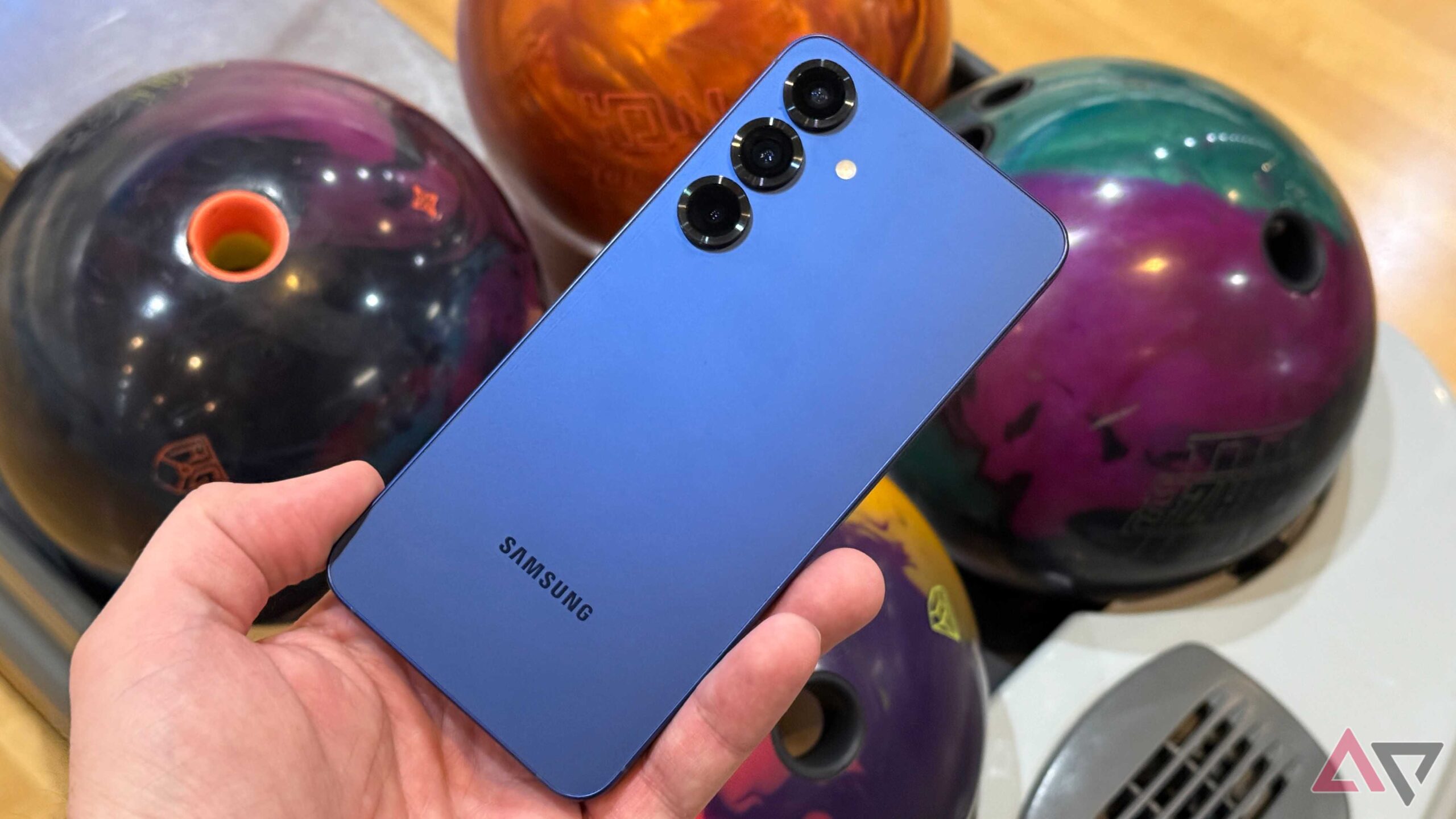
    When Samsung drops a new “FE” device, you already know what time it is. The Fan Edition (FE) lineup has always been Samsung’s way of saying: “We hear you, our fans, and here’s a phone that gives you the best bits of our flagships—without emptying your bank account.”

    From the S20 FE that kicked things off, to today’s brand-new Galaxy S25 FE, this range has consistently delivered the features people actually care about: solid performance, beautiful displays, versatile cameras, and long-term updates. No unnecessary fluff, just flagship essentials at a friendlier price.

    And the S25 FE? It’s looking like Samsung’s best Fan Edition yet. Let’s dive in.

    Design That Means Business

    Samsung shaved the weight and slimmed things down—7.4 mm thin and just 190 g. But don’t get it twisted; it’s not fragile. With Armor Aluminium, Gorilla Glass Victus+, and IP68 water/dust resistance, this phone is built to last.

    On the front, you get a gorgeous 6.7-inch Dynamic AMOLED 2X display, up to 120 Hz refresh rate, and a peak brightness of 1,900 nits. Translation: smooth scrolling, vibrant colors, and no squinting in sunlight.


    Performance: Powered by Exynos 2400

    Under the hood, the Exynos 2400 processor paired with 8 GB RAM makes sure the S25 FE keeps up with whatever you throw at it. And with a vapor chamber that’s 10% larger, overheating during gaming or multitasking won’t be an issue.

    Storage goes from 128 GB all the way to 512 GB, so you’ve got room for your photos, videos, and of course, those “I’ll watch it later” downloads.


    Battery That Keeps You Moving

    The 4,900 mAh battery is designed for all-day usage, and when it’s time to juice up, you’ve got 45W fast charging on deck.


    Cameras: AI Takes the Wheel

    Triple rear camera setup:

    • 50 MP main lens for sharp shots
    • 12 MP ultrawide for group moments and landscapes
    • 8 MP telephoto with zoom power

    Up front, a 12 MP selfie shooter enhanced with Samsung’s ProVisual Engine. That means clearer selfies, better HDR, and some AI magic like Generative Edit, Instant Slow-Mo, and smarter low-light snaps.

    Galaxy AI + Long-Term Updates

    This phone doesn’t just look smart, it is smart. With One UI 8 on Android 16, the S25 FE comes packed with Samsung’s Galaxy AI features:

    • Gemini Live (real-time visual Q&A)
    • Now Bar & Now Brief (info at a glance)
    • Circle to Search
    • Audio Eraser (because background noise is annoying)

    Oh, and Samsung promises seven years of OS and security updates. That’s basically future-proofing your phone until the 2030s.

    S25 Vs S25 FE

    When stacked against the base Galaxy S25, the S25 FE holds its ground surprisingly well. Both devices share Samsung’s top-tier design language, sharp AMOLED displays, and a focus on flagship-level performance. However, the S25 takes the lead with a slightly faster chipset, more premium build materials, and advanced camera processing. The S25 FE, on the other hand, strikes a balance between affordability and performance, trimming back on some luxuries like the telephoto zoom and top-end finishes but keeping the essentials that matter most—like a smooth display, reliable cameras, and long-lasting battery life. For most users, the S25 FE delivers 80–85% of the S25 experience at a noticeably lower price, making it an attractive option for those who want flagship vibes without the flagship price tag

    Price: The Sweet Spot

    At around $650 / £649 / €749, the Galaxy S25 FE delivers a lot of flagship energy for less than the full-blown Galaxy S25. For many people, this might just be the smarter buy.

    The Samsung Galaxy S25 FE is exactly what the FE series is meant to be: a well-balanced phone that gives you the flagship experience without the flagship price tag. If you’ve been eyeing the Galaxy S25 but hesitated because of the cost, this is your sign.

    It’s slim, powerful, AI-packed, and future-proof. Honestly, the only real question is: what color are you picking?

  • Hello world!

    Welcome to WordPress. This is your first post. Edit or delete it, then start writing!

  • M4 MacBook Air Review: Apple’s Lightest Beast Just Got Smarter

    Back in 2020, Apple flipped the script on laptop performance with the debut of the M1 chip, a homegrown processor that blended insane speed with whisper-quiet efficiency. The MacBook Air, once mocked for being underpowered, suddenly became the go-to laptop for students, creators, and professionals who wanted power without the bulk.

    Fast forward to 2025, and here we are with the M4 MacBook Air, a sleek evolution of Apple’s silicon journey that started with a promise of performance per watt… and just kept getting better. But how does the M4 stack up against its predecessors? And is this the perfect time to upgrade?

    Let’s break it down.

    Design: Same Vibe, Polished to Perfection

    From the outside, not much has changed and that’s not a bad thing. The M4 MacBook Air keeps the 13-inch and 15-inch ultra-thin chassis from the M2/M3 era. It’s still the sleekest in its class, with a solid aluminium build, MagSafe charging, two Thunderbolt ports, and the 1080p webcam nicely tucked in the notch.

    It’s available in four colours, Midnight (which now resists fingerprints better), Starlight, Space Grey, and Silver. If you’re a sucker for minimalist style, this laptop is your vibe.

    Performance: M4 is Small but Mighty

    The real star of the show? The new M4 chip, built using second-gen 3nm technology. Apple claims it’s up to 1.5x faster than the M2 and offers a 20% boost over the M3 in real-world usage.

    From editing 4K videos in Final Cut Pro to having 40 Chrome tabs open while streaming Apple TV+, the M4 Air handles it all without breaking a sweat — or a fan (because it still doesn’t have one!).

    Benchmarks show:

    • Geekbench 6: ~3,800 single-core, ~12,000 multi-core
    • Better neural engine performance for AI tasks
    • Faster SSD speeds, especially on higher-tier models

    Battery Life: A True All-Day Laptop

    Despite the performance bump, the battery life remains outstanding. You’re still getting up to 18 hours of video playback or a full day of mixed usage. That’s thanks to Apple’s obsession with efficiency and the optimisations baked into macOS Sequoia.

    This thing is built for people who want to plug in once and forget about charging for the next 10-12 hours.

    AI-Ready: Apple Intelligence on Board

    With the M4 chip, the MacBook Air joins the wave of Apple Intelligence, Apple’s new take on AI and on-device machine learning.

    Whether it’s:

    • Summarising emails in Mail
    • Generating images with Image Playground
    • Or helping you write smarter with system-wide writing tools

    …the M4 MacBook Air is ready for the AI future.

    Should You Upgrade?

    Here’s the breakdown:

    Current MacBookShould You Upgrade?
    Intel-based MacBookAbsolutely. It’ll feel like jumping into the future.
    M1 MacBook AirYes — for the AI features and better display/performance.
    M2 MacBook AirMaybe. The speed bump is noticeable but not essential.
    M3 MacBook AirHold off — unless you need AI features now.

    Final Verdict: The Best MacBook Air Yet?

    The M4 MacBook Air isn’t a radical redesign because it doesn’t have to be. It’s the most refined version of a near-perfect machine: faster, smarter, and more efficient.

    If you’re looking for a laptop that’s light on your bag but heavy on performance, this is the one to get in 2025.

    Where to Buy?

    Ready to upgrade? Check out our deals on M4 MacBook Air at Ogabassey.com – your plug for premium tech at the right price.

  • Still a Powerhouse: Why the MacBook Pro M1 Pro Remains a Top Choice in 2025 and Beyond

    When Apple unveiled the M1 Pro chip in late 2021, it was hailed as a game-changer. Designed for creative professionals, developers, and power users, the MacBook Pro M1 Pro delivered a huge leap in performance, battery life, and efficiency, building on the fine legacy of its predecessor, the revolutionary M1.

    Now, in 2025, with the M2, M3 and M4 chips already on the market (and rumours of the M5 swirling), you might wonder: Is the MacBook Pro M1 Pro still worth it? The answer is a confident yes, and here’s why.

    M1 Pro

    Raw Performance That Still Competes

    The M1 Pro chip is no slouch. Built on a 5nm architecture, it features up to a 10-core CPU and 16-core GPU, offering seriously fast performance for multitasking, code compilation, video editing, 3D rendering, and high-resolution audio work.

    Even by 2025 standards, the M1 Pro handles most professional workflows with ease:

    • 4K and even 8K video editing in Final Cut Pro or DaVinci Resolve? Smooth.
    • Running multiple virtual machines or Docker containers? No hiccups.
    • Logic Pro sessions with hundreds of tracks and plugins? It barely breaks a sweat.

    It’s not just fast—it’s consistently fast, without the overheating and fan noise you’d expect from equivalent Intel-based machines.

    Unmatched Battery Life

    The M1 Pro MacBook Pro offers 17–21 hours of battery life, depending on usage. That’s still ahead of many 2025 laptops, especially those that rely on power-hungry discrete GPUs and x86 architecture.

    If you’re a freelancer, digital nomad, or student who needs to work unplugged all day, this is the kind of reliability that matters.

    Display That Still Shines Bright

    The Liquid Retina XDR display on the 14-inch and 16-inch M1 Pro MacBook Pros remains one of the best in the business:

    • Up to 1600 nits peak brightness
    • Extreme dynamic range and HDR support
    • 120Hz ProMotion for smooth scrolling and responsiveness
    • DCI-P3 wide color gamut

    Whether you’re colour grading, illustrating, or just watching HDR content on Netflix, this screen still rivals—or outperforms—many newer machines in 2025.

    Ports, Ports, and More Ports

    One of the most appreciated changes in the M1 Pro MacBooks was Apple’s decision to bring back essential ports. You get:

    • 3x Thunderbolt 4 ports
    • HDMI 2.0 (good enough for most)
    • SDXC card slot
    • MagSafe 3 charging
    • A headphone jack with support for high-impedance headphones

    In a world where many laptops still push the “dongle life,” the M1 Pro MacBook Pro stands out for its built-in flexibility.

    M1 Pro: Quiet, Cool, and Fan-Smart

    Thanks to Apple Silicon’s efficiency, thermal management is stellar. Even under load, the M1 Pro MacBook rarely gets hot or revs up its fans unless absolutely necessary. That’s not just pleasant—it means better performance and longevity.

    macOS + Apple Ecosystem = Seamless Productivity

    Running macOS Sequoia (and compatible with future macOS updates for several more years), the M1 Pro MacBook Pro continues to receive Apple’s best software features:

    • Continuity with iPhone and iPad
    • FaceTime handoff, Sidecar, Universal Clipboard
    • Built-in dictation, transcription, and privacy tools

    If you’re embedded in the Apple ecosystem, the MacBook Pro M1 Pro is still a productivity dream.

    Price Advantage in 2025

    Now that newer models like the M2 Pro, M3 Pro, M4 Pro and their Ultra siblings have taken the spotlight, the M1 Pro models are more affordable—especially in the refurbished or used market. You can find them at excellent prices with great specs, making them an incredible value proposition.

    Compared to a new mid-range laptop in 2025, the M1 Pro still often wins on performance, display, battery life, and overall experience.

    Built to Last

    With its solid aluminium unibody chassis, durable keyboard, spacious trackpad, and vibrant display, the M1 Pro MacBook Pro is built to last at least 5–7 years of intense use. Add AppleCare or a third-party protection plan, and you’ve got peace of mind.

    Final Verdict: Still a Pro’s Choice

    In 2025 and beyond, the MacBook Pro with M1 Pro remains an absolute beast for creators, developers, students, and professionals who need performance, portability, and reliability. Its combination of power, battery life, ports, and build quality makes it one of the smartest buys today—especially as prices drop.

    If you’re considering it, go for it. The M1 Pro MacBook Pro is still very much a pro machine.

  • ⚡️ Fast Charging Explained: What to Know Before You Burn Your Battery

    Fast charging? It’s 2025, and we’re addicted to speed. Phones that refresh 120 times per second. Laptops that boot in under 5 seconds. And of course—chargers that promise to take your battery from 0 to 100 real quick.

    But here’s the deal: fast charging is a blessing and a trap. We have spoken about it here before but you need a refresher.

    One moment, you’re bragging that your phone charges in 25 minutes. The next, you’re wondering why your battery health is dropping faster than your screen time report.

    Before you keep chasing wattage and fancy charging bricks, let’s break down exactly how fast charging works—and what you need to know before your battery gets fried.


    ⚙️ What Is Fast Charging, Really?

    Fast charging is the tech that pumps more power (watts) into your device to charge it quicker than standard 5W or 10W charging.

    Here’s how it works:

    • Watts = Volts × Amps
    • Fast chargers boost one or both to push more juice into your phone.
    • Most phones today support 15W–45W fast charging, while some Android monsters like Xiaomi and Infinix now do 100W+. That’s insane.

    ⚠️ Fun fact: The USB-C standard technically supports up to 240W.


    🧠 But Wait—Is More Watts Always Better?

    Short answer: No.

    Your device is only going to pull as much power as it can handle. That’s why using a 120W charger on a phone that supports only 30W won’t speed things up—it’ll just warm your charger and pad your electricity bill.

    Even worse? Cheap or fake fast chargers can mess with voltage regulation and end up damaging your battery, motherboard, or charging port.


    🔥 The Hidden Cost of: Battery Health

    Let’s be honest—fast charging is convenient. But over time, it can wear down your battery faster.

    Here’s what you should know:

    • Heat is the real enemy. Charging faster = more heat = more wear on lithium-ion cells.
    • Battery health degrades quicker when fast charging is used constantly.
    • Many brands (looking at you, Xiaomi, OnePlus, and Infinix) throw huge charging numbers at you—but most don’t talk much about long-term battery life.

    Even Apple limits fast charging on iPhones to around 20W, and they do it on purpose.

    So, while charging fast won’t kill your battery overnight, it will age it faster if you rely on it 24/7.


    🛑 Before You Plug In: Read This First

    If you want to enjoy fast charging without burning through your battery’s lifespan, keep these tips in mind:

    Use the original or certified charger that came with your device. If you’re using a third-party charger, make sure it supports the same charging protocol (like USB Power Delivery, Qualcomm Quick Charge, VOOC, etc.)

    Avoid charging to 100% all the time—staying between 20% and 80% is the sweet spot for battery health.

    Unplug once full—leaving your phone plugged in overnight at high wattage isn’t doing it any favours.

    Turn off high-performance apps or mobile data while charging—especially during fast charging sessions.

    If your phone has a setting for ‘Optimised Charging’ or ‘Battery Protection’—turn it ON.


    📱 But… What About Wireless Fast Charging?

    It exists, yes. It’s flashy. But wireless charging is less efficient and generates more heat than wired fast charging. It’s the equivalent of trying to fill a bucket using a misting fan.

    Unless your wireless charger is made by the phone manufacturer (and even then), you’re better off using a good old-fashioned USB-C cable when speed and battery longevity matter.


    🚀 Final Thoughts: Speed vs. Longevity

    Fast charging is here to stay. And let’s be real—it’s a life-saver when you’ve got 4% and a meeting in 10 minutes.

    But like all good things, moderation is key.

    Don’t use fast charging as your daily default. Instead, treat it like a performance boost—handy when you need it, but not your phone’s main diet.

    Your battery (and future self) will thank you.

  • Unpacked Explosion: Samsung’s Game-Changing Powerful Galaxy Z Foldables; Fold 7, Flip 7 & Watch 8 Unveiled

    From Gimmick to Game-Changer Samsung’s Foldables and Wearables Just Got Serious

    It’s wild to think that just a few years ago, foldable phones were a quirky tech demo; fragile, chunky, and more novelty than necessity. The original Galaxy Fold? Groundbreaking, yes but it creaked, cracked, and couldn’t convince the mainstream.

    But July’s Galaxy Unpacked was the turning point. The company has not only refined its foldable smartphones to near-perfection, but it’s also pushing smartwatches to new heights infusing everything with AI and making these devices feel less like experiments and more like the future.

    The stars of the show?

    • Galaxy Z Fold 7
    • Galaxy Z Flip 7 and Flip 7 FE
    • Galaxy Watch 8, Watch 8 Classic, and Watch Ultra

    Each one is slimmer, smarter, and more user-focused than ever before. Whether you’re a tech enthusiast, creative, or someone just looking for your next premium upgrade we have put together the juice from the event. Let’s dive in.

    The Foldables: Galaxy Z Fold 7- Slimmer, Smarter, Stronger

    Samsung’s flagship foldable is no longer just about “wow” factor, it’s ready for work, play, and everything in between.

    What’s New:

    • Thinner Build: Now only 8.9 mm closed, which is nearly half the thickness of the first Galaxy Fold. It’s lighter too about 215g making it feel less like a prototype and more like a proper daily driver.
    • Display: A 6.5″ cover screen opens into a stunning 8″ inner AMOLED display with peak brightness of 2,600 nits. Watching videos, reading PDFs, or multitasking feels seamless.
    • Camera: A 200MP main sensor (the same one from the Samsung S25 Ultra) leads the charge, with enhanced AI-assisted photography and real-time editing using Gemini AI.
    • Performance: Snapdragon 8 Gen 3 “Elite” with built-in AI, improved cooling, and better hinge mechanics for a smoother fold.
    • No S-Pen support, which will disappoint some fans but the trade-off is a more streamlined form factor.

    Starting at $1,999 / £1,799, pre-orders are open now, with shipping beginning July 25.

    Galaxy Z Flip 7 & Flip 7 FE: Fun Meets Function

    The Flip series has always been about flair, but now it’s growing up.

    Galaxy Z Flip 7:

    • Bigger Cover Display: The new 4.1″ FlexWindow supports full apps, real-time Gemini access, and swipeable widgets—like a tiny smartwatch.
    • Internal Display: A sharp 6.9″ AMOLED at 120Hz, with a newly improved hinge and 4,300mAh battery for longer screen-on time.
    • AI Features: Circle to Search, instant translations, voice summarization, and camera enhancements all on-device.

    Price: Starts at $1,099 / £1,049

    Flip 7 FE:

    • The new Fan Edition model is Samsung’s way of making foldables more affordable.
    • Smaller 3.4″ cover display, modest chip (likely Snapdragon 7 Gen 3), and same 6.7″ internal screen.
    • No DeX or wireless charging, but a strong entry point into the world of foldables.

    Launching at $899 / £849 — this is Samsung’s most accessible flip phone yet.

    Galaxy Watch 8 Series & Watch Ultra: Smarter Health, Rugged Design

    Samsung’s watches just got a serious glow-up combining AI smarts with sleek, durable design.

    Watch 8 & Watch 8 Classic:

    • New ‘Squircle’ Shape: A cross between square and circle—modern and minimalist.
    • AI Coaching: Real-time feedback on sleep, stress, vascular health, and antioxidant levels.
    • Performance: Faster chips, better battery, and Wear OS 6 for snappy navigation.
    • Size Options: 40mm and 44mm in aluminium or stainless steel.

    Price: $349 (Watch 8) | $499 (Classic)

    Watch Ultra:

    • Built for adventure: Titanium case, 10ATM water resistance, military-grade durability.
    • GPS & Tracking: Highly accurate for athletes and explorers.
    • Storage & Battery: Doubled to 64GB with improved battery endurance and all the AI perks.

    MSRP: $649 / €699

    Gemini & Galaxy AI Everywhere

    Samsung is fully embracing AI—not just as a gimmick, but as a core part of the experience.

    Across All Devices:

    • Circle to Search: Instantly find anything on your screen using your finger—works across apps.
    • Live Translations: On-device, secure, and fast—no need for an internet connection.
    • Photo Magic: With the new ProVisual Engine, edit, enhance, or completely transform your photos with one tap.
    • AI Companion: Gemini acts as your everyday assistant, helping with planning, writing, camera prompts, and even workouts.

     Should You Buy It?

    If you’ve been waiting for the foldable era to get real, this is it.

    • Galaxy Z Fold 7 is the productivity dream: multitasking beast, massive screen, and no compromises.
    • Galaxy Z Flip 7 is the lifestyle phone: fun, stylish, compact, and now genuinely useful with AI.
    • Galaxy Watch 8 Series redefines personal health tracking, and the Watch Ultra is built for those who live life off the grid.

    Yes, the prices are still high but what you’re getting is premium hardware, meaningful AI integration, and the most polished foldables in the world right now.

    Final Thoughts

    Samsung didn’t just launch devices, they launched a clear vision of the future: AI at your fingertips, flexible screens that adapt to your lifestyle, and wearables that finally do more than count steps. From the bold Fold 7 to the rugged Watch Ultra, there’s something in this lineup for everyone.

    This wasn’t just another Unpacked event.

    It was a line in the sand: foldables are no longer the future they’re the now.

  • M1, M2, or M3 MacBook in 2025: Which One Should You Actually Buy?

    So, you’re in the market for a MacBook in 2025 and suddenly find yourself staring at Apple’s alphabet soup of chips: M1, M2, M3.

    They all look sleek.
    They all say MacBook on the tin.
    They all cost a decent chunk of your salary.

    But which one is actually worth your money right now?

    Let’s cut through the Apple-speak and break down which MacBook you should buy in 2025—and which one you might regret taking home.

    Quick Recap: What’s the Difference Between M1, M2, and M3?

    Apple’s M-series chips are built in-house and power everything from the basic MacBook Air to high-end MacBook Pros. Here’s a no-fluff breakdown:

    ChipRelease YearKey Upgrades
    M12020The OG. Super-efficient, silent, and still shockingly good.
    M22022Slightly faster, better graphics, more memory bandwidth.
    M32023/2024Built on 3nm tech. Faster, cooler, more efficient, supports fancy effects and AI features.

    Now let’s talk about how they actually feel to use in 2025.

    M1 MacBook: Still Holding It Down

    You’d think a 4-year-old chip would be gathering dust by now, but nope, the M1 MacBook Air is still a beast for everyday use.

    Great for:

    • Students, writers, Zoom warriors, and anyone who lives in Chrome, Google Docs, and Spotify
    • Watching Netflix, editing photos, and basic video editing
    • Battery life that refuses to quit (think 12+ hours)

    Weaknesses:

    • Can feel sluggish if you’re pushing it with 4K video edits or multitasking with dozens of apps
    • No support for multiple external monitors
    • Not future-proof if you plan to keep your laptop 5+ years

    Used/refurbished models often go for 30–40% less than newer ones, making this the budget king.

    Buy it if: You want a reliable MacBook that just works and you don’t need cutting-edge speed.

    M2 MacBook: The Middle Child That Grew Up

    The M2 didn’t blow anyone’s socks off when it dropped, but it did smooth out the edges of the M1 and in 2025, that matters.

    What’s better than M1:

    • Faster performance for apps like Final Cut, Logic Pro, and Photoshop
    • Handles heavier multitasking more gracefully
    • Brighter screen on the M2 Air
    • Can run one external monitor (still not amazing, but better than M1)

    Still not a huge leap from M1unless you’re a power user, you may not feel the difference day-to-day.
     Some versions (especially the base 256GB models) have slower SSD speeds than M1. Sneaky move, Apple.

    Buy it if: You want something newer than M1 but don’t want to pay premium for M3. It’s the Goldilocks pick.

    M3 MacBook: The New Hotness (But Do You Need It?)

    The M3 MacBooks brought real upgrades—especially in the 14-inch Pro models. Built on a 3nm chip, the M3 runs cooler, faster, and draws less power. Basically, it’s a quiet killer.

    What it crushes:

    • 4K and 8K video editing
    • AI-driven tools and visual effects
    • Running multiple heavy apps simultaneously
    • Better support for external displays (finally!)

    But it costs more especially if you’re buying the M3 Pro or M3 Max models.

    Also, for most average users, the performance difference isn’t life-changing unless you’re editing large files or compiling code every day.

    Buy it if: You’re a creative pro, developer, or tech enthusiast who wants the best and doesn’t mind the price tag.

    Which One Should You Buy?

    Let’s make this easy:

    If you’re a student, writer, or casual user:

    Go for the M1 if you’re on a budget. It’s still a killer machine for 80% of what most people do.

     If you’re a designer, light video editor, or multitasker:

    M2 is your sweet spot. Better screen, better graphics, more future-proof but still under the Pro-level price tag.

    If you’re a creative pro, developer, or just want the best:

    Get the M3 especially the 14” MacBook Pro. You’ll notice the difference, and it’s built to last.

    Bonus Tips Before You Buy

    • Avoid the base 256GB models on M2/M3 if you care about speed go 512GB minimum for better SSD performance.
    • Used is not a crime: used devices from Ogabassey come with warranty and serious savings.
    • Check for discounts, especially during our Awoof Thursday deals.
    ChipBest ForWorth Buying in 2025?
    M1Budget users, students✅ Yes – if you get a good deal
    M2Balanced users, creatives✅ Yes – best value for most
    M3Power users, future-proofing✅ Yes – if you can afford it

    TL; DR?
    If you need a laptop right now in 2025 and you’re not pushing pro-level workloads, the M2 MacBook Air is the smartest buy. It’s got the right balance of speed, efficiency, and longevity without the premium M3 or M4 price.

    But hey, if you see a killer deal on an M1 or you’re ready to future-proof with M3 or even the M$, go for it. Just know what you’re getting.

  • Best iPhones Under ₦500,000 in 2025: Still a Smart Buy?

    Let’s face it, buying a brand-new iPhone in 2025 can feel like trying to buy land in Banana Island. Between the ₦1M+ price tags of the iPhone 14, 15, and the16 models, a lot of us are asking the real question:

    “Which iPhone can I actually afford without selling my kidney?”

    Well, good news: You don’t have to compromise too much. Whether you’re switching from Android, upgrading your dusty iPhone 8, or just want something that won’t lag when you open Instagram, there are solid iPhones under ₦500,000 that still hold their own in 2025.

    Let’s break down your top 3 picks that combine performance, battery, and style all without blowing your budget.

    1. iPhone 11 – The Budget Beast

    Average Price: ₦345,000

    This is your no-fuss, still-very-capable entry into the iPhone world in 2025.

    Key Features:

    • 6.1” Liquid Retina HD Display
    • A13 Bionic chip (still smooth for everyday use)
    • Face ID, decent battery, and solid cameras
    • Dual 12MP rear lenses with Night Mode

    Why It’s Still Worth It:

    iPhone 11 might be from 2019, but it doesn’t feel ancient. The phone runs iOS 18 without breaking a sweat, takes great photos, and handles TikTok, Reels, and day-to-day tasks like a champ. It’s especially perfect for students or first-time iPhone users.

    Heads-Up:

    • No 5G (if you care about that)
    • LCD screen, not OLED (colours won’t “pop” as much)
    • Basic design, a little bulky by 2025 standards

    Verdict: If you just want a reliable, smooth, no-frills iPhone that won’t drain your wallet—this is it.

    2. iPhone 12 – The Sweet Spot

    Average Price: ₦390,000

    Want 5G, OLED, and a thinner design without going broke? iPhone 12 hits the sweet spot between price and power.

    Key Features:

    • 6.1” Super Retina XDR OLED display
    • A14 Bionic chip
    • MagSafe support (welcome to the wireless charging club)
    • Sleek, modern design that still looks new

    Why It’s Still Worth It:

    Compared to the 11, the iPhone 12 feels faster, brighter, and more future-proof. It handles mobile gaming, photo editing, and multitasking with zero lag. The camera system also gets a bump in clarity and low-light performance.

    Heads-Up:

    • Battery life is just okay (nothing special)
    • Still no ProMotion (120Hz) display

    Verdict: If you want that premium feel without crossing ₦400K, the iPhone 12 is probably the best value right now.

    https://blog.ogabassey.com/is-the-iphone-13-in-2025-review3. iPhone 13 – The Max Budget Boss

    Average Price: ₦500,000

    You’ve hit the budget ceiling but you’re also getting one of the most balanced iPhones Apple ever made.

    Key Features:

    • 6.1” Super Retina XDR OLED display (brighter than the 12)
    • A15 Bionic chip (also used in iPhone 14)
    • Better cameras, better battery life, cinematic mode for video
    • Comes in fun colours + smaller notch

    Why It’s Still Worth It:

    This is the iPhone to buy in 2025 if you want the “latest without being latest.” The iPhone 13 still runs like a new phone, supports all current apps and updates, and is powerful enough for content creators, casual vloggers, and multitaskers.

    Heads-Up:

    • No Always-On Display (that came with iPhone 14 Pro)
    • ₦500,000 means you’ll need to shop smart to avoid overpaying

    Verdict: If you’ve got exactly ₦500K to spend and want the most future-proof iPhone possible stop scrolling, this is it.

    💡 So, Which Should You Buy?

    iPhonePrice (₦)StrengthIdeal For
    iPhone 11~345,000Reliability on a budgetStudents, basic users
    iPhone 12~390,000Best all-round valueEveryday users, professionals
    iPhone 13~500,000Performance & longevityPower users, creators

    A Few Buying Tips:

    • Always buy from a trusted source – If it’s “UK used” or “clean as new,” ask questions. Check battery health and IMEI.
    • iOS updates – All three phones will get iOS updates till at least 2026–2027. You’re safe.
    • Watch for deals – Prices may vary based on condition, storage, or retailer promos. Don’t rush.

    Final Thoughts: Under ₦500K, You’re Still in the Game

    Don’t let Apple’s new pricing intimidate you. You don’t need to splurge on an iPhone 15 or 16 to stay connected, create content, or enjoy that buttery-smooth iOS experience.

    With options like the iPhone 11, 12, and 13 still going strong in 2025, you can get the Apple quality you want without wrecking your account balance.

  • Apple vs Samsung Ecosystem: Which One Actually Works Better?

     Apple vs Samsung? Nah! We all know the smartphone war is old news. But in 2025, the real battle isn’t just about which phone takes the best selfie, it’s about the ecosystem.

    Because let’s face it: it’s not just your phone anymore. It’s your laptop, earbuds, tablet, smartwatch, TV, even your fridge. The question now is:

    Which tech giant makes your devices play nicest together Apple or Samsung?

    Both ecosystems promise seamless sync, smart features, and a “once you’re in, you’ll never leave” kind of experience… Even more profound when you remember that Apple users typically say, “Once you go Mac, you can’t go back”. Let’s break it down.

    Apple Ecosystem: The Cult of Convenience

    Apple’s magic sauce isn’t just the sleek hardware; it’s how everything talks to everything else.

    • AirDrop? Instant file sharing from iPhone to MacBook or iPad in two taps.
    • Handoff? Start writing an email on your iPhone, finish it on your Mac.
    • Universal Clipboard? Copy on one device, paste on another…like witchcraft.
    • FaceTime and iMessage? Available across iPhone, iPad, and Mac so you can keep up the gossip while switching screens.

    But the real cheat code? Continuity. You can answer calls on your Mac, use your iPhone camera as a webcam, or unlock your Mac with your Apple Watch.

    And because Apple builds the hardware and software for every device, everything just… works. Smoothly. Quietly. Like an expensive butler who never complains.

    Best for: People who hate fiddling with tech. If you’re deep in the Apple Garden, you’ll rarely feel the need to leave.

     Samsung Ecosystem: Surprisingly Slick, With a Twist and with Windows in mind

    Samsung’s not sitting quietly. Over the past few years, they’ve levelled up their ecosystem game big time, especially if you’re using Galaxy phones, tablets, and laptops together.

    Here’s what it offers:

    • Quick Share: Samsung’s answer to AirDrop, works across Galaxy devices and even with Windows.
    • Samsung Flow: Sync your phone and PC, unlock your laptop with your phone, share files, and mirror your screen.
    • Second Screen: Turn your Galaxy Tab into an extra display for your Galaxy Book.
    • Call & Text Continuity: Use your tablet or laptop to handle calls and messages from your phone.
    • SmartThings: Control your smart home setup, track your Galaxy devices, and even ping your lost phone from your Samsung TV.

    Where Samsung really shines is variety. It has TVs, fridges, earbuds, smartwatches, and even air conditioners that are all smart and connected. And most of these work with Android and Windows too—giving you flexibility Apple just doesn’t.

    Best for: Tech tinkerers, Android loyalists, and people who want more choice in hardware.


    Apple vs Samsung Ecosystem: Feature Face-off

    FeatureApple Samsung
    File sharingAirDrop (Instant, reliable)Quick Share (Good, cross-platform)
    Device syncSeamless (macOS, iOS, iPadOS)Good (Android + Windows)
    App continuityExcellent (Safari, Notes, Mail, etc.)Decent (Samsung apps, DeX, Flow)
    Hardware varietyLimited (Only Apple gear)Massive (Phones, TVs, tablets, appliances)
    Smart homeHomeKit (Secure but limited)SmartThings (Versatile, works with more brands)
    Learning curveBeginner-friendlySlightly more setup needed
    Cross-platform supportNope (walled garden)Yes (plays well with others)

    So, Which Ecosystem Actually Works Better?

    It depends on who you are and how you use tech.

    Pick Apple if:

    • You already use an iPhone or Mac.
    • You want everything to just work with no configuration.
    • You value privacy, simplicity, and long-term support.
    • You’re not planning to switch away from Apple anytime soon.

    Pick Samsung if:

    • You want flexibility between Android and Windows.
    • You like having multiple options for tablets, TVs, smartwatches, etc.
    • You’re willing to dig into the settings to customize things your way.
    • You want a smart home that connects beyond just Apple-approved gadgets.

    Final Verdict: Closed vs Open

    • Apple is the perfect walled garden—beautiful, efficient, but you play by their rules.
    • Samsung is more like a smart jungle—wild, full of options, and open to different platforms.

    If you’re a creative pro, student, or business user who just wants things to work, Apple has the edge.

    If you’re a tech lover, smart home nerd, or someone who hates being locked into one brand, Samsung’s ecosystem will give you room to play.

  • Android or iPhone: Which Is Better for Content Creators in 2025?

    Android or iPhone? Let’s settle this once and for all. If you’re a content creator in 2025, should you be rocking an iPhone or an Android device?

    Whether you’re filming beauty reels, vlogging your day in Lagos traffic, or editing your next viral skit for TikTok, your phone is your production studio. So, choosing the right one isn’t just about team iOS vs. team Android anymore, it’s about which device helps you create faster, easier, and better.

    And while both sides have come a long way, the gap between them has shifted in surprising ways.

    Let’s break down the pros, cons, and honest realities of using an Android or iPhone as a content creator in 2025.

    Camera Quality: iPhone Still Leads in One Key Area

    Both Android and iPhones now have incredible cameras. Period. But they shine differently.

    iPhone (13 Pro Max and up):

    • Shoots consistently clean video.
    • Top-tier colour science and HDR.
    • Dynamic range is fire even in harsh sunlight.
    • Native app (Camera) gives you cinematic mode, ProRes, and top-notch stabilisation with little effort.

    Android (Samsung S24 Ultra, Pixel 8 Pro):

    • More megapixels (hello, 200MP).
    • Better low-light shots with some models.
    • More flexible lenses and manual control.
    • Native 8K support and crazy zoom (which you probably won’t need, but hey).

    Verdict:
    If video is your bread and butter especially for platforms like YouTube and Instagram, iPhone wins for consistency. Android can hit higher highs, but it takes more setup and tweaking to get there.

    Editing Workflow: It’s an Ecosystem Thing

    Let’s talk editing.

    iPhone + MacBook = chef’s kiss.

    • AirDrop your 4K files instantly.
    • Use iMovie, CapCut, or Final Cut for mobile (yes, it’s now on iPad and iPhone).
    • iCloud syncs everything.

    Android + Windows/Chromebook:

    • Samsung’s Quick Share works—most of the time.
    • File transfers can be chunky (especially on mid-range phones).
    • Third-party apps like InShot, VN, and Kinemaster still shine, though.

    Bonus: With iPhones, your videos stay in HEVC or ProRes. Androids often record in formats that aren’t always friendly with editing platforms unless you convert.

    Verdict:
    If you value speed and simplicity, Apple’s ecosystem is hard to beat. Android works, but it takes a bit more tech know-how to set up smooth workflows.


    Accessories & Audio: iPhone Has the Edge—Barely

    Let’s talk audio because good sound is half the battle.

    • iPhone: Pairs easily with wireless lav mics (Rode, DJI). Tons of plug-and-play support. Lightning (or now USB-C) accessories are stable.
    • Android: More universal (thanks to USB-C), but compatibility with certain mics and gimbals is hit-or-miss unless your phone is from Samsung, Pixel, or OnePlus.

    Gimbals? Tripods? LED rigs? Most work cross-platform, but iPhone models still have more accessory-specific support.

    Verdict:
    It’s a close one. iPhone still gets more “creator-first” love from accessory makers. But Android is catching up fast especially Samsung.

    AI & Productivity: Android Is Smarter, But iPhone Is Smoother

    In 2025, AI is baked into everything.

    Android (especially Galaxy AI):

    • Transcript your videos automatically.
    • Live translations while recording.
    • Smart erase, object removals, generative edits on the fly.

    iPhone (with Apple Intelligence):

    • Summarises notes, improves scripts, auto-edits captions.
    • Voice isolation during video calls.
    • But most AI features are still rolling out slowly.

    Verdict:
    If you want next-level AI tools today, Android gives you more flexibility and raw power. But iPhone’s experience feels more polished and less experimental.


    Pricing & Value: Android Is Still the Budget King

    Let’s be real, iPhones aren’t cheap. W highlighted that much here

    • iPhone 15 Pro Max starts around ₦1.8 million
    • Samsung Galaxy S24 Ultra starts around ₦1.3 million

    But here’s the kicker:
    You can get a solid Android content creator phone (Pixel 7, Samsung A74, OnePlus 11) for half that price and still shoot killer content with a bit of skill and good lighting.

    Verdict:
    On a budget? Android has way more options. But if you’re investing in longevity and resale value, iPhone is still a safe bet.


    Final Verdict: Which Should You Pick?

    CategoryWinner
    Video QualityiPhone (more consistent)
    Photo FlexibilityAndroid (more control)
    Editing WorkflowiPhone (ecosystem magic)
    AccessoriesiPhone (wider support)
    AI ToolsAndroid (more advanced)
    Budget OptionsAndroid (more value for money)

    So… Android or iPhone is better for content creators in 2025?

    iPhone if you want a reliable, no-hassle tool that “just works.”
    Android if you want more control, flexibility, and power especially if you’re willing to learn your gear.

    Both can create viral content. The real difference? How much work you want to put in behind the scenes.

    Final Thoughts: Your Phone is Your Studio

    At the end of the day, your smartphone is just a tool. iPhone, Android it won’t make you go viral. But it can make your life easier (or harder) depending on what you create and how you work.

    So, pick the one that fits your style, your budget, and your workflow and then go make content that slaps.