Category: Tech News

  • Galaxy Unpacked July 2025: What to Expect from Samsung’s Great Foldables, Wearables, and AI

    Samsung’s annual Galaxy Unpacked event returns on July 9th, 2025, in Brooklyn, and expectations are sky-high. From refined foldables to powerful AI features and a few surprise reveals, this year’s showcase is shaping up to be one of Samsung’s most ambitious yet.

    If you’re considering an upgrade or just curious about where mobile tech is headed, here’s a breakdown of the devices and innovations Samsung is expected to unveil — and why it matters.

    Galaxy Z Fold 7 – The Flagship Fold Gets Even Smarter

    Samsung is expected to introduce a significantly redesigned Galaxy Z Fold 7, possibly with an “Ultra” variant. The key improvements? A thinner design, larger internal display, and enhanced AI features built directly into the experience.

    What we’re hearing:

    • Sleeker form factor – slimmer when folded, more comfortable to carry.
    • Expanded inner screen – likely growing to 8.2 inches for better productivity.
    • Camera upgrades, including a potential 200MP main sensor (borrowed from the Galaxy S25 Ultra).
    • Snapdragon 8 Gen 3 or Exynos 2500 chip, depending on the region.
    • Deeper Galaxy AI integration with tools for real-time summarization, live translation, and photo editing.
    galaxy unpacked 2025 event confirmed

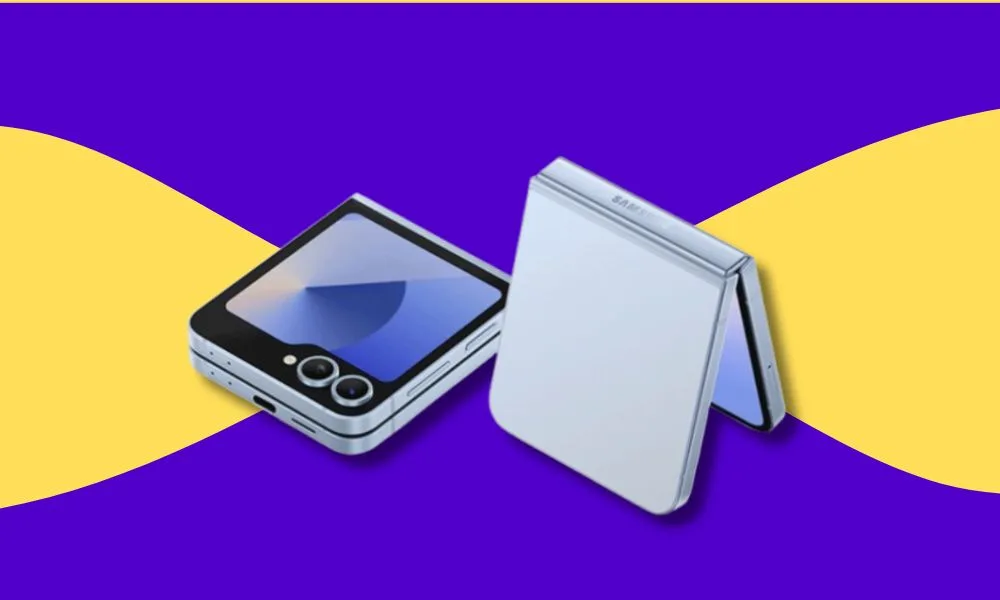
    Galaxy Z Flip 7 – A Stylish Update to a Fan Favourite

    The Galaxy Z Flip 7 is expected to receive thoughtful refinements rather than a complete overhaul. Expect:

    • Larger cover display (around 4 inches), offering more functionality without unfolding.
    • New colours including Blue, Coral, and Black.
    • Performance upgrade via the new Exynos 2500 processor.
    • AI capabilities such as enhanced voice dictation, photo clean-up, and contextual suggestions.

    It’s shaping up to be a smarter, more refined version of one of Samsung’s best-selling foldables.

     Galaxy Z Flip 7 FE – Making Foldables More Accessible

    For the first time, Samsung may introduce a Foldable Fan Edition (FE) the Z Flip 7 FE targeted at budget-conscious consumers.

    Expected features include:

    • A slightly smaller and simpler display setup.
    • Mid-tier processor (possibly last year’s Exynos chip).
    • 8GB RAM and 128GB storage base model.

    This could be Samsung’s move to bring foldable phones to the mainstream at a more affordable price point and it’s one worth watching.

    Galaxy Watch 8 Series – Fitness, Wellness, and Beyond

    Samsung’s upcoming Galaxy Watch 8 series is also expected to make an appearance. Early reports suggest:

    • A more efficient Exynos W1000 chipset.
    • Improved battery life and performance.
    • Tighter integration with Galaxy AI for wellness tracking, sleep coaching, and personalised health insights.
    • A potential Watch Ultra with rugged design and pro-grade sensors.

    This is part of Samsung’s continued investment in its wearable ecosystem and the AI-driven features might finally set it apart.

    Galaxy Buds Core – New Budget Option for Wireless Audio

    While information remains limited, Samsung may also introduce the Galaxy Buds Core a more affordable pair of wireless earbuds designed for everyday use. We’re expecting:

    • Clean audio experience.
    • Long battery life.
    • Possibly no Active Noise Cancellation to keep costs down.

    Project Moohan – Samsung’s XR Future on Display?

    Samsung is rumoured to tease Project Moohan, its mixed-reality headset co-developed with Google and Qualcomm (the Android platform’s response to Apple’s Vision Pro). While it may not launch at this event, we might see a sneak peek or developer-focused preview.

    With Apple’s Vision Pro already in the wild, Samsung will likely want to plant its flag in the AR/VR space soon.

    One UI 8 and Galaxy AI: The Software That Ties It All Together

    This year’s event isn’t just about hardware. Samsung is set to unveil One UI 8, based on Android 16, with Galaxy AI at its core. Expect:

    • Smarter multitasking on foldables.
    • Live translations, note summaries, and voice command enhancements.
    • On-device AI that helps with productivity, creativity, and personalisation without needing a constant cloud connection.

    Samsung’s goal is clear: make AI feel like a natural part of your everyday mobile experience.

    A Major Evolution, Not Just an Upgrade

    Samsung’s July 2025 Unpacked event feels less like a product refresh and more like a redefinition of its mobile future. Foldables are getting slimmer and smarter. Wearables are becoming more capable. And Galaxy AI is emerging as the software glue that ties it all together.

    Catch the livestream on July 9th via Samsung.com or on YouTube. Don’t forget to check back, we’ll break it all down, including pricing, availability in Nigeria, and which devices are worth your money.

  • WWDC 2025: 5 Game‑Changing Apple Announcements

    Every June, Apple sets the tech world abuzz with its Worldwide Developers Conference, WWDC . This year, the company introduced sweeping upgrades across its software ecosystem. From a breathtaking visual redesign to smart on-device AI, Apple is redefining how we interact with its devices. Here are the top 5 announcements that stood out.

    1. Universal “Liquid Glass” Design Language

    Apple has unveiled Liquid Glass, its most expansive design refresh since iOS 7, now rolling out across iOS 26, iPadOS 26, macOS Tahoe 26, watchOS 26, tvOS 26, and even visionOS 26. Inspired by Vision Pro, this translucent, dynamic, glass‑like aesthetic adapts to light, dark modes, and even movement transforming buttons, sliders, tab bars, and more. Liquid Glass makes interfaces feel fluid and expressive

    2. New Year‑Based OS Naming

    Apple is simplifying version names by aligning them with the year of release: iOS 26, macOS Tahoe 26, watchOS 26, and so on. This shift makes naming consistent and easy to follow.

    3. Apple Intelligence Goes On‑Device & Open to Developers

    Apple is aggressively expanding its Apple Intelligence AI suite:

    • Live translations in Messages, FaceTime, and Phone powered by on-device AI
    • The Foundation Models framework allows third-party apps to leverage Apple’s AI models offline and with privacy
    • Image Playground integrates OpenAI’s ChatGPT for creative image generation

    4. iOS, iPadOS & macOS User Experience Upgrades

    iOS 26 brings:

    • Liquid Glass applied across core apps—Camera has cleaner layouts, Safari goes full‑screen, and Phone now combines Favorites, Recents, Voicemail in one scroll
    • Message enhancements: group typing indicators, customizable chat backgrounds, even Genmoji for AI‑powered emojis.
    • Phone app filters spam with Call Screening and Hold Assist
    • Apple Music, Maps, Wallet, CarPlay and other system apps enjoy updated visuals and smarter widgets.

    iPadOS 26 embraces Mac‑style multitasking with resizable windows, a new menu bar, and the Preview app.

    macOS Tahoe 26 upgrades Spotlight with smart filters and actions (e.g., writing notes, sending emails) and merges Phone, Live Activities, and the new Games hub into Mac.

    5. watchOS 26 Enhancements + Workout Buddy

    Introducing watchOS 26, featuring Liquid Glass aesthetics and clever gestures:

    • Wrist Flick gesture: dismiss notifications, calls, timers with a simple wrist motion
    • A new Workout Buddy powered by Apple Intelligence offers real‑time coaching, encouraging messages, milestone alerts, and post‑workout summaries
    • Enhanced Smart Stack, live message translation, Smart Replies, accessibility tools like live captions and Notes app native to the Watch.

    Bonus: Apple Watch Gesture Control & Voice Isolation

    AirPods are gaining new superpowers:

    • Tapping the AirPods stem remotely captures photos on iPhone or iPad.
    • Voice Isolation for recordings helps improve call clarity in noisy environments—perfect for on‑the‑go creators.

    WWDC 2025 sets a new standard for design elegance and intelligence. The Liquid Glass overhaul brings a beautifully cohesive aesthetic, while on‑device AI, Live Translation, and the new Workout Buddy signal Apple’s equal focus on user empowerment and developer opportunity. The consistent year‑based OS naming adds clarity, while updates across platforms ensure a smoother, richer user experience. Whether you’re a casual user or app developer, these changes usher in a more intelligent, intuitive Apple ecosystem.

  • One UI 7 Review: Top New Features on Samsung’s Latest Update You Shouldn’t Miss

    Samsung has officially rolled out One UI 7, the latest iteration of its Android-based interface—and it’s not just a cosmetic update. Packed with intelligent features powered by Galaxy AI, enhanced personalization options, and a smoother, more refined user experience, One UI 7 reflects Samsung’s ambition to make your smartphone not just smarter, but more intuitive and helpful in your everyday life. Whether you’re capturing photos, managing calls, or customizing your home screen, this update brings meaningful improvements that feel like a leap forward, not just a routine upgrade. Here’s an overview of the standout features:

    AI-Powered Enhancements

    • Galaxy AI Integration: One UI 7 incorporates Galaxy AI features like Writing Assist for text summarization and formatting, and AI Select, which offers context-aware suggestions such as creating GIFs from videos.
    • Generative Edit: This tool allows users to remove objects, expand backgrounds, and intelligently resize images using AI-driven photo editing capabilities.
    • Call Transcripts: The Phone app now supports call recording with real-time transcription in over 20 languages, enhancing accessibility and record-keeping.

    User Interface & Customization

    • Now Bar: Inspired by Apple’s Dynamic Island, the Now Bar displays live activities—such as music playback or timers—on the lock screen and status bar, allowing quick access and control.
    • Revamped Quick Settings & Notifications: The Quick Settings panel and notification shade are now separated for clarity. Users can switch between them with directional swipes and customize the layout extensively.
    • Enhanced Widgets & App Drawer: Widgets offer more customization options, including adjustable sizes and transparency. Additionally, the app drawer now supports a vertical scrolling layout, catering to user preferences.

    Camera & Media Features

    • Camera Interface Overhaul: The camera app has been redesigned for easier one-handed use, with controls repositioned for accessibility. Pro modes now include adjustable zoom speed and exposure lock features.
    • Motion Photo Enhancements: Users can transform motion photos into boomerangs or slow-motion clips and export them as videos, adding versatility to media creation.
    • Audio Eraser: This feature enables selective audio editing, allowing users to isolate or remove background sounds from videos, enhancing audio clarity.

    Security & Privacy Upgrades

    • App Lock: Users can now secure individual apps with a separate passcode or biometric authentication, adding an extra layer of privacy.
    • Knox Matrix Dashboard: An upgraded security dashboard provides insights into the security status of connected Samsung devices, enabling proactive threat management.
    • Identity Check: This opt-in feature enhances theft prevention by requiring biometric authentication for critical security changes, especially when suspicious activity is detected.

    Gaming & Performance

    • Game Hub Enhancements: Gamers can customize performance settings per game, including frame rate and resolution, ensuring optimal gaming experiences.
    • Gaming Motion Smoothness: Users can select between 60Hz and 120Hz refresh rates for gaming, balancing performance and battery life.

    One UI 7 marks a significant step forward in Samsung’s software evolution, blending AI capabilities with user-centric design to enhance overall device functionality.

  • Introduction: Embracing the Apple Ecosystem on a Budget

    Apple’s ecosystem is renowned for its seamless integration across devices, offering a user experience that’s hard to match. However, Apple devices are also relatively expensive. The good news? You don’t need to empty your wallet to enjoy the benefits of Apple’s interconnected world. With strategic choices and a bit of savvy shopping, you can build a cohesive Apple setup that serves your needs without financial strain.​


    Starting Point: The iPhone SE (2022)

    The iPhone is the cornerstone of the Apple ecosystem. For budget-conscious users, the iPhone SE (2022) is a compelling choice. It offers the powerful A15 Bionic chip, ensuring smooth performance and longevity. While it may not have all the bells and whistles of its pricier counterparts, it provides access to iOS features and services that form the backbone of the ecosystem.​


    Audio Companion: AirPods (2nd Generation)

    AirPods are more than just wireless earbuds; they’re a gateway to Apple’s seamless audio experience. The 2nd Generation AirPods offer reliable performance, easy pairing, and integration with Siri. They might lack the noise cancellation of the Pro models, but they deliver quality sound and the convenience of Apple’s H1 chip at a more accessible price point.​


    Computing Power: MacBook Air with M1

    For those needing a laptop, the MacBook Air with the M1 chip strikes a balance between performance and affordability. It handles everyday tasks with ease and benefits from the energy efficiency of Apple’s silicon. While newer models exist, the M1 MacBook Air remains a solid choice for users entering the Apple ecosystem.​Tom’s Guide


    On-the-Go Convenience: Apple Watch SE

    The Apple Watch SE offers many of the features found in higher-end models, such as fitness tracking, notifications, and seamless integration with your iPhone. It’s a practical addition for those looking to extend their ecosystem to their wrist without the premium price.​


    Enhancing the Experience: Budget-Friendly Accessories

    To further enrich your Apple ecosystem, consider these affordable accessories:​

    • USB-C to USB Adapter: Useful for connecting older peripherals to newer Macs.​
    • Laptop Stand: Elevates your MacBook for better ergonomics and cooling.​

    These accessories can enhance functionality without significant investment.​


    Conclusion: Building Your Ecosystem Thoughtfully

    Creating an Apple ecosystem doesn’t require an all-at-once approach. Start with the essentials that align with your daily needs and expand as your budget allows. By prioritizing compatibility and functionality, you can enjoy the cohesive experience Apple offers without overspending.​

  • How to Choose the Right Storage for Your Phone

    Let’s face it: nothing is more frustrating than trying to snap a quick pic or download a new app, only to be slapped with the dreaded “Storage Almost Full” notification. Whether you’re buying a new phone or just trying to understand what all those GBs mean, choosing the right storage option can save you headaches down the line.

    But how much is enough? Let’s break it down.

    1. Understand What Phone Storage Actually Means

    Your phone’s storage is the space available for everything: your apps, photos, videos, documents, and even the operating system. It’s like the closet of your digital life — and if it gets too full, performance can start to lag.

     Pro tip: The operating system itself usually takes up 5–15 GB, depending on your phone’s brand and model. So, that “128GB” phone? You might only have about 110GB usable.


    2. Know Your Usage Style

    Different users have different storage needs. Ask yourself:

    •  Are you a music hoarder who downloads albums instead of streaming?
    •  Do you take lots of photos and 4K videos?
    • Are you a gamer with graphics-heavy games that eat up 2–5GB each?
    • Do you travel a lot and want your entertainment offline?

    If you answered “yes” to most of these, go for higher storage — think 256GB or more.

    If you mostly use cloud services and stream content, you could get away with 64GB or 128GB.


    3. What About Cloud Storage?

    Cloud storage (like Google Drive, iCloud, or OneDrive) can help free up space, especially for photos and videos. But remember:

     You need a stable internet connection to access files.

    Many cloud options have monthly fees once you go beyond the free tier.

    So, while cloud storage is great for offloading some weight, don’t rely on it entirely — especially if you’re often offline or have limited data.


    4. Futureproofing Is Smart

    Phones are an investment, and many people now use them for 2–4 years. Apps are getting bigger, photo and video resolutions are increasing, and storage needs are only going up.

    So even if you don’t need 256GB right now, you might thank yourself for it in a year or two.


    5. Can You Expand It?

    Some Android phones still come with microSD card slots, letting you expand storage later. iPhones and most modern flagships? Nope — what you buy is what you’re stuck with.

    So, if you’re going for a phone without expandable storage, lean toward higher built-in storage just to be safe.


    TL; DR: What Should You Pick?

    • Light User (calls, browsing, streaming): 64GB–128GB
    • Average User (photos, apps, occasional video): 128GB–256GB
    • Power User (4K videos, games, offline content): 256GB–512GB+
    • Business or Creator: 512GB–1TB (yes, that exists now!)

    Final thoughts? When in doubt, go higher — storage regrets are real, and upgrading isn’t always possible. Better to have too much than not enough!

    Got questions or trying to decide between two models? Drop them in the comments or shoot me a message — let’s find the perfect fit for your digital lifestyle.

  • Still Thinking About an Intel MacBook in 2025? Here’s What You Need to Know Before You Buy

    If you’re on the hunt for your next laptop and wondering whether an Intel MacBook is still a smart choice in 2025, you’re not alone. With Apple’s shift to its own blazing-fast M-series chips, many users are left questioning whether Intel-powered MacBooks are still worth considering.

    Let’s break it down so you can make an informed decision without second-guessing yourself later.


    Apple Has Moved On — Should You?

    In case you missed it: Apple began ditching Intel chips back in 2020, and by 2023, the last Intel Mac (the Mac Pro) was quietly retired. Fast-forward to 2025, and Apple’s own chips, now up to the M4, are dominating the MacBook lineup with speed, battery life, and AI power that Intel Macs simply can’t keep up with.

    Bottom line? Apple has fully moved on. The real question is: should you?


    Performance: Intel Just Can’t Keep Up

    Even if you’re not a tech wizard, the difference is obvious. M1, M2, M3, and now M4 MacBooks are cooler (literally), quieter, and significantly more power-efficient than their Intel counterparts. Whether you’re editing videos, browsing with 20 tabs open, or just streaming Netflix, Apple Silicon handles it all more smoothly.

    And let’s not forget battery life. While Intel MacBooks might get you through half a workday, M-series laptops cruise for 15-20 hours like it’s nothing.


    Missing Out on the Good Stuff

    Here’s where things get tricky. If you go for an Intel MacBook now, you might  be cut off from newer macOS features. Things like:

    • Live Text (copy text directly from images)
    • On-device dictation and translation
    • Portrait mode in FaceTime
    • Seamless AI integrations

    Most of these goodies are exclusive to Apple Silicon. Even the upcoming macOS versions may stop supporting Intel Macs entirely by 2026. That’s just around the corner.


    Software Support Is Winding Down

    Apple is generous with updates—but not forever. Most Intel MacBooks are already hitting the 5-to-7-year support window. That means no more fancy features, and eventually, no more security updates either.

    If you’re planning to keep your next laptop for a few years, you don’t want to be stuck on the software sidelines.


     What About Pricing?

    Intel MacBooks can be found for cheap on the used markets, and that might be tempting. But even a good deal on old tech isn’t a great deal if it becomes obsolete in a year or two.

    Meanwhile, newer M-series MacBooks are becoming cheaper too—especially the M1 and M2 models—and offer far better value for the long haul.


    So… Should You Still Buy an Intel MacBook in 2025?

    Short answer? No—unless you have a very specific need for Intel-only apps (and even that’s becoming rare).

    For everyone else, whether you’re a student, a content creator, or someone who just wants a reliable daily driver—go Apple Silicon. You’ll get better performance, longer battery life, longer support, and access to Apple’s latest features.


    Your Move

    If you’re investing in a MacBook in 2025, don’t bet on yesterday’s tech. Intel had a good run, but the future of the Mac is Apple Silicon.

    Got your eye on a particular model? Send us a DM and we will give you the best deal there is. Ogabassey Never Disappoints!

  • Are Samsung Laptops Really Good? A Deep Dive into Their Latest Models

    Samsung has long been a dominant force in the smartphone and TV markets, but its presence in the laptop arena has been more understated. With the release of its latest Galaxy Book series, Samsung aims to solidify its position among top-tier laptop manufacturers. Let’s explore the strengths and weaknesses of their recent models to determine if Samsung laptops truly stand out.


    1. Galaxy Book3 Ultra: A Powerhouse for Professionals

    The Galaxy Book3 Ultra is Samsung’s flagship laptop, designed to rival high-end competitors like the MacBook Pro and Dell XPS. It boasts a 16-inch 3K AMOLED display with a 120Hz refresh rate, delivering vibrant visuals ideal for creatives and professionals. Under the hood, it offers up to an Intel Core i9-13900H processor and NVIDIA GeForce RTX 4070 GPU, ensuring robust performance for demanding tasks.​

    Pros:

    • Stunning AMOLED display with high refresh rate​
    • Powerful CPU and GPU configurations​
    • Sleek and lightweight design for a 16-inch laptop​.

    Cons:

    • Battery life is underwhelming, especially during intensive tasks, lasting around 5-6 hours ​
    • Premium pricing may not justify the performance gains over competitors​

    2. Galaxy Book3 Pro 360: Versatility Meets Elegance

    The Galaxy Book3 Pro 360 is a 2-in-1 convertible laptop that combines performance with flexibility. Featuring a 16-inch AMOLED touchscreen and bundled with the S Pen, it’s tailored for users who value both productivity and creativity. Equipped with Intel’s 13th Gen processors, it handles multitasking with ease.​

    Pros:

    • High-quality AMOLED display with touch and pen support​
    • Convertible design offers versatility.
    • Lightweight and premium build quality.

    Cons:

    • Performance may lag behind competitors in the same price bracket​.
    • Battery life is decent but not exceptional​

    3. Galaxy Book4 Edge: Embracing AI and Portability

    The Galaxy Book4 Edge represents Samsung’s foray into AI-integrated laptops. Powered by the Snapdragon X Elite processor, it promises enhanced AI capabilities, such as real-time translations and intelligent meeting summaries. Its ultra-lightweight design and impressive battery life of up to 22 hours make it ideal for on-the-go users

    Pros:

    • Advanced AI features enhance productivity​
    • Exceptional battery life​
    • Lightweight and portable design​.

    Cons:

    • Performance may not match traditional Intel or AMD-powered
    • Limited availability in certain markets

    Final Verdict: Are Samsung Laptops Worth It?

    Samsung’s latest laptops showcase the company’s commitment to innovation, blending powerful hardware with sleek designs and unique features. The Galaxy Book3 Ultra stands out for professionals seeking top-tier performance, while the Book3 Pro 360 offers versatility for creatives. The Book4 Edge introduces promising AI capabilities, catering to the evolving needs of modern users.​

    However, potential buyers should consider factors like battery life and pricing. While Samsung laptops excel in design and display quality, some models may fall short in battery longevity and offer less value compared to competitors.​

    Recommendation: If you’re deeply integrated into the Samsung ecosystem and prioritize design and display quality, these laptops are compelling choices. However, if battery life and cost-effectiveness are top priorities, exploring other brands might be beneficial.

  • Not All Processors Are Created Equal: Here’s the Least You Should Settle For in 2025

    Let’s be honest: buying a laptop in 2025 can feel like going to a restaurant with too many options—you just want to eat, not read a novel. Whether you’re a student, a content creator, or just looking for something solid for everyday tasks, one thing you cannot afford to overlook is the processor.

    In this post, we’ll break down the minimum Intel and AMD processors you should go for based on your needs


     1. For Students & Casual Users

    Basic Tasks: Browsing, Typing, Watching YouTube, and Zoom Calls

     Minimum Intel: Intel Core i5 (8th Gen or newer)
    AMD Equivalent: AMD Ryzen 3 3000 series or Ryzen 5 3000 series

    These chips are the sweet spot for casual users. The 8th Gen i5 brought a serious jump in core count (quad-core became standard), which means you’ll be able to run Chrome (even with your 37 open tabs) without the fan sounding like a jet engine.

     Other recommendations:

    • Go for 8GB RAM minimum
    • SSD (at least 256GB) – don’t go near HDDs in 2025 (except it comes in alongside an SSD)
    • Full HD screen (1920×1080)

     Why it matters:
    Anything less than an i5 8th Gen or Ryzen 3 3200U and you’ll be praying your laptop doesn’t freeze during your online test.


     2. For Professionals & Remote Workers

    Tasks: Emails, Presentations, Light Excel Work, Light Design Work

     Minimum Intel: Intel Core i5 (10th Gen or newer)
    AMD Equivalent: Ryzen 5 4000 or 5000 series

    These chips are built for multitasking. The 10th Gen Intel CPUs improved on efficiency and graphics—perfect for light photo editing, spreadsheets with 1000 rows, and having Zoom, Slack, and Chrome open at the same time.

    Other recommendations:

    • 16GB RAM if your budget allows (but 8GB can still work)
    • Backlit keyboard (because let’s be real—power cuts are still a thing)
    • USB-C port for fast charging and docking

     Why it matters:
    You need speed and reliability, not a spinning wheel while you’re trying to meet a deadline.


    3. For Creators & Designers

    Tasks: Photoshop, Lightroom, Video Editing, Canva, Content Creation

    • Minimum Intel: Intel Core i7 (10th Gen or newer)
    • AMD Equivalent: Ryzen 7 4000/5000 series

    These CPUs give you more cores, threads, and better integrated graphics. This matters when you’re editing 4K video or batch-processing 50 images at once.

     Other recommendations:

    • 16GB RAM or more (for Adobe products, this is essential)
    • Dedicated GPU (like NVIDIA MX450 or RTX series if possible)
    • Large SSD (512GB or 1TB)

    Why it matters:
    Rendering videos or editing RAW photos on a weak processor is like trying to cook jollof rice with candlelight. Just don’t do it.


     4. For Gamers & Power Users

    Tasks: Gaming, Coding, Streaming, Virtualization, 3D Modelling

    • Minimum Intel: Intel Core i7 (11th Gen or newer)
    • AMD Equivalent: Ryzen 7 5000 series or Ryzen 9

    If you’re gaming or using heavy software like Blender or Unity, you need power and speed. These CPUs support high-end GPUs, faster memory, and better thermal performance.

     Other recommendations:

    • 16GB to 32GB RAM
    • RTX 3050, 4050 or higher GPU
    • High refresh rate screen (120Hz or more)

    Why it matters:
    The difference between an 11th Gen i7 and an 8th Gen i5 in gaming is night and day. And when you’re streaming or coding for hours, you want something that can keep up.


    Bonus Tips Before You Buy

    • Don’t buy anything older than 8th Gen Intel or Ryzen 3000 — seriously, just walk away.
    • Check battery life reviews—some AMD laptops are better in this area.
    • Always match your laptop to your primary use case. Don’t overspend for power you don’t need.

    Final Thoughts

    At the end of the day, your processor choice sets the tone for your laptop’s entire performance.

    Need help choosing the perfect laptop? Send us a DM on Instagram.

  • MacBooks and RAM: Is 8GB Really Enough?

    For years, Apple has insisted that 8GB of RAM is plenty for a MacBook. But if that’s true, why did they quietly upgrade all their base models to 16GB RAM with the latest M4 chips?

    Let’s break it down.


    Apple’s 8GB Claim: Enough or Just Marketing?

    Back in 2023, Apple’s VP of Worldwide Product Marketing, Bob Borchers, made a bold claim:

    “8GB on an M3 MacBook Pro is probably analogous to 16GB on other systems.”

    In other words, Apple was saying that their unified memory system made 8GB feel like more. And to be fair, Apple’s RAM is more efficient than what you’d find on a typical Windows laptop.

    But here’s the thing—efficiency can only take you so far. As apps get more demanding, that 8GB limit starts to show, especially if you’re a power user.


    Real-World Use: Where 8GB Falls Short

    Sure, 8GB is fine if you’re just browsing the web, checking emails, and streaming Netflix. But the moment you:

    Open dozens of Chrome tabs (you know you do)
    Run Photoshop, Premiere Pro, or Xcode
    Use AI tools or Apple Intelligence features
    Multitask like crazy

    …your Mac is gonna start struggling.

    Instead of running smoothly, it’ll rely on swap memory (a fancy way of saying it uses your SSD as extra RAM). And while Apple’s SSDs are fast, they’re not as fast as actual RAM. This can make your Mac feel sluggish over time.


    The M4 Upgrade: Apple Finally Listened

    So, if 8GB was supposedly enough, why did Apple double the base RAM to 16GB with the latest M4 MacBooks?

    The answer is simple: Because 8GB isn’t enough anymore.

    With Apple Intelligence (their AI-powered features) rolling out soon, Macs need more memory to keep up. Instead of arguing that 8GB is fine, Apple just… stopped selling base models with 8GB altogether.


    So, Should You Buy a 16GB MacBook?

    Short answer: Yes, absolutely.

    Whether you’re a casual user or a professional, 16GB is the better long-term investment. It ensures your Mac stays fast and future-proof for years to come.

    If you already have an 8GB MacBook, don’t panic—it’ll still work fine for basic tasks. But if you’re buying a new Mac in 2024, get at least 16GB RAM. Your future self will thank you.


    What Do You Think?

    Have you ever struggled with an 8GB MacBook? Or do you think Apple was right all along? Let’s talk in the comments!

  • Apple Launches iPhone 16E—Affordable Powerhouse with A18 Chip and In-House Modem

    Apple has officially expanded its iPhone 16 lineup with the iPhone 16E, a new budget-friendly model designed to deliver flagship-tier performance at a more accessible price. But don’t let the “E” fool you—this device packs surprises, including Apple’s first in-house 5G modem and a controversial price tag. Here’s everything you need to know.


    Key Specs & Features

    • A18 Chip: Borrowed from the iPhone 16/Pro series, this 3nm processor promises desktop-level speeds and improved AI-driven tasks.
    • Apple’s First In-House Modem: Ditching Qualcomm, Apple’s custom 5G modem aims for better battery efficiency and carrier compatibility (though real-world testing will be key).
    • Single-Camera System: A streamlined 48MP rear sensor with computational photography upgrades like Smart HDR 6 and enhanced Night Mode.
    • 6.1-inch Super Retina XDR Display: 60Hz refresh rate, Ceramic Shield protection, and 2,000 nits peak brightness.
    • iOS 19: Pre-loaded with Apple’s latest OS, featuring AI enhancements and new customization tools.

    Design: Familiar but Fresh

    While the iPhone 16E mirrors the iPhone 16’s flat-edge design with an aluminium frame and colour-infused glass back, it eerily reminds us of the iPhone 14. New finishes include “Mist Gray” and “Sunset Pink.” At 7.4mm thick, it’s Apple’s slimmest “E” model yet, though the lack of a ProMotion display may disappoint some.


    Camera Compromise?

    While the single-lens setup seems like a downgrade, Apple insists software advancements will compensate. The 48MP sensor supports 2x lossless zoom and improved portrait depth mapping. The 12MP front camera also gains autofocus—a first for non-Pro iPhones.


    The Price Shock

    Despite its “budget” positioning, the iPhone 16E starts at $699∗∗(128GB), 100 higher than the iPhone SE (2023). This is interesting pricing strategy considering their rivals like Samsung with the S24 FE and Google with the Pixel 8a offer comparable specs for LESS


    Release Date & Availability

    Pre-orders begin February 25, with shipments starting March 7. Apple confirms the 16E will launch in over 30 countries, (they didn’t mention Nigeria directly) but Ogabassey never disappoints.


    The Bottom Line

    The iPhone 16E is a bold gamble: it brings Pro-grade silicon and Apple’s modem ambitions to a lower tier but at THAT price? Will the A18 chip and iOS 19 synergy justify the cost? We’ll find out in March.