Category: Mobile Gadgets

  • Pixel 6 Review in 2025: Hits, Misses, and Updates

    When Google launched the Pixel 6 back in October 2021, it was more than just another phone release, it was a statement. With a bold redesign, the debut of Google’s custom Tensor chip, and a renewed focus on AI-driven features, the Pixel 6 aimed to challenge Apple and Samsung head-on. Now in 2025, four years later, the question is simple: Is the Pixel 6 still a good buy?

    Let’s explore its journey from a rocky start to its current usability, how it stacks up against modern competitors, and whether it’s still worth your money today.

    The Rocky Start: Early Issues That Nearly Sank the Pixel 6

    Like many first attempts, the Pixel 6 stumbled out of the gate.

    • Fingerprint Sensor Frustration: The under-display fingerprint sensor was widely panned for being slow and inconsistent. Google blamed the issue on enhanced security algorithms, but later rolled out firmware updates to improve accuracy and speed.
    • Connectivity Problems: Many users experienced spotty network connections and dropped Wi-Fi signals, which were addressed in later security and system updates.
    • Overheating & Battery Drain: The original Tensor chip, while powerful for AI tasks, had heat management issues under heavy load, especially during gaming or video recording.

    Despite these initial complaints, Google kept refining the software, and by 2023, most of these bugs were squashed turning the Pixel 6 into a far more stable and enjoyable phone to use.


    Pixel 6 in 2025: Still Capable, Still Smart

    Here’s where the Pixel 6 surprisingly shines in 2025:

    • Running Android 15: Thanks to Google’s generous software support, the Pixel 6 is still getting feature drops and monthly security patches. Android 15 runs smoothly, with no significant slowdowns in everyday use.
    • AI-Driven Smarts: Newer features like Gemini Live for on-device translation and call-screening enhancements have been extended to the Pixel 6. You’ll also find updated versions of Magic Eraser, Voice Typing, and Google’s signature Call Hold/Direct My Call tools.
    • Camera That Holds Its Own: The 50MP main sensor and Google’s computational photography still deliver crisp, balanced shots. Night Sight, Motion Mode, and Portrait Mode continue to impress even compared to newer flagships.

    Comparing the Pixel 6 to the Competition in 2025

    So, how does the Pixel 6 stack up against its midrange and older flagship rivals today?

    FeaturePixel 6 (2021)Galaxy S21 FE (2022)iPhone 13 (2021)OnePlus 10T (2022)
    Software SupportUntil 2026 (monthly)Ended in 2024iOS updates until 2027Likely ended or unofficial
    Main Camera50MP + AI features12MP triple12MP dual50MP + OIS
    Performance (2025)Tensor (still decent)Snapdragon 888 (aging)A15 Bionic (strong)Snapdragon 8+ Gen 1
    Battery & Efficiency4614 mAh4500 mAh3240 mAh4800 mAh
    AI Features (2025)Gemini Lite, Call AssistMinimalSiri only (limited)Basic Google AI tools
    • Versus Samsung Galaxy S21 FE: Samsung’s midrange darling from 2022 has lost official support and doesn’t run Android 15 natively. While its screen is a bit smoother (120Hz), the Pixel 6’s camera and AI tools win on usability.
    • Versus iPhone 13: Apple’s long software support makes the iPhone 13 a tough competitor. However, the Pixel 6 offers more AI and assistant-driven tools out of the box, and better customization on Android.
    • Versus OnePlus 10T: The 10T is faster with a newer chip, but lags behind in long-term updates and lacks the same level of AI integration or camera tuning that Google provides.

    Should You Still Buy the Pixel 6 in 2025?

    Yes — but with caveats.

    Buy it if:

    • You’re looking for a budget-friendly phone (available refurbished or under £250).
    • You want clean, up-to-date Android with useful AI features.
    • You love photography and appreciate Google’s smart camera software.

    Avoid it if:

    • You need the absolute best gaming performance.
    • You care about the fastest charging or highest refresh rates.
    • You’re worried about future-proofing beyond 2026.

    Our Verdict

    The Pixel 6 in 2025 is proof that a phone doesn’t need to be brand-new to be smart, secure, and usable. Despite its rocky launch, Google’s consistent support has turned it into a solid everyday performer — especially for users who value intelligent features over raw specs.

    If you’re considering a second-hand or discounted model and can live with slightly older hardware, the Pixel 6 still offers incredible value and functionality.
  • Infinix vs. Redmi: Which Brand Offers the best value for Midrange Smartphone users

    In Nigeria’s bustling smartphone market, budget-conscious consumers often find themselves choosing between Infinix and Redmi. Both brands have carved niches in the budget and midrange segments, offering devices that promise impressive specifications without breaking the bank. But which brand truly delivers the best value for money for Nigerian users? Let’s delve into hardware capabilities, software updates, after-sales service, and highlight some of their latest offerings.


    Hardware Comparison

    Infinix:

    • Infinix Note 50 Pro Plus: This device boasts a MediaTek Dimensity 8350 chipset, 12GB RAM, and 256GB UFS 4.0 storage. It features a 6.78-inch AMOLED display with a 120Hz refresh rate, a 108MP main camera, and a 5200mAh battery supporting 100W wired charging and 50W wireless charging
    • Infinix Hot 50i: A more affordable option, it comes with a 6.7-inch IPS LCD, 4GB/6GB/8GB RAM options, 128GB/256GB storage, a 48MP main camera, and a 5000mAh battery with 18W charging.

    Redmi:

    • Redmi Note 14 4G: Equipped with a 6.67-inch AMOLED display, Snapdragon 685 processor, 6GB RAM, 128GB storage, a 50MP main camera, and a 5000mAh battery with 33W fast charging.
    • Redmi A3 Pro: Features a 6.88-inch IPS LCD, MediaTek Helio G81 Ultra processor, 4GB RAM, 128GB storage, a 50MP main camera, and a 5150mAh battery with 10W charging.

    Verdict: Infinix often offers higher RAM and faster charging capabilities in its devices, even in the budget segment. However, Redmi provides solid performance with efficient processors and AMOLED displays in its midrange offerings.


     Software Updates

    Infinix:

    • Update Policy: Infinix’s Zero, Note, and GT series receive two major Android OS updates and three years of security patches. However, the Hot and Smart series have less consistent update support.

    Redmi:

    • Update Policy: Redmi’s Note series, like the Note 14 4G, is set to receive up to four Android OS updates and six years of security updates, ensuring longevity and better software support.

    Verdict: Redmi has a more robust and transparent update policy, especially for its Note series, providing users with longer software support compared to Infinix.


     After-Sales Service

    Infinix:

    • Service Centres: Infinix, through its partnership with Carlcare, has an extensive network of authorized service centres across Nigeria, offering warranty services, repairs, and customer support.

    Redmi:

    • Service Centres: Redmi’s after-sales service infrastructure in Nigeria is less extensive, with fewer authorized service centres, which might pose challenges for users seeking repairs or support.

    Verdict: Infinix has a more established and accessible after-sales service network in Nigeria, providing users with peace of mind regarding device maintenance and support.


     Latest Comparable Models

    FeatureInfinix Note 50 Pro PlusRedmi Note 14 4G
    Display6.78″ AMOLED, 120Hz6.67″ AMOLED, 120Hz
    ProcessorMediaTek Dimensity 8350Snapdragon 685
    RAM & Storage12GB RAM, 256GB UFS 4.06GB RAM, 128GB
    Main Camera108MP50MP
    Battery & Charging5200mAh, 100W wired, 50W wireless5000mAh, 33W wired
    Software Updates2 OS updates, 3 years security4 OS updates, 6 years security
    After-Sales ServiceExtensive (Carlcare)Limited

    Conclusion

    For Nigerian users prioritizing hardware specifications and accessible after-sales service, Infinix stands out with its impressive device features and extensive support network. However, for those who value long-term software updates and a more consistent update policy, Redmi offers a compelling choice, especially with its Note series.

    Ultimately, the best value for money depends on individual priorities:

    • Choose Infinix if you seek high-performance hardware and reliable local support.
    • Choose Redmi if long-term software support and efficient performance are your main concerns.

    Both brands offer excellent options in the budget and midrange segments, catering to the diverse needs of Nigerian consumers.

  • Google Pixel Phones: Overhyped or Worth the Hype in 2025?

    When you think about Android smartphones, certain names dominate the conversation — Samsung, Xiaomi, OnePlus, and of course, Google Pixel. Over the years, Pixel devices have carved out a reputation for top-notch cameras, clean Android experience, and timely software updates. But despite all the praise, one question continues to bubble up among users and tech reviewers alike:

    Are Pixel devices overhyped?

    At Ogabassey, we decided to dive deep into the Pixel ecosystem and figure out whether Google’s flagship phones truly live up to their hype or if we’re just dealing with clever marketing and tech-world peer pressure.


    The Pixel Promise: Why People Love It

    Let’s start with the good. Because, to be fair, Google Pixel phones do get a lot of things right.

    • Software First: Pixel phones run stock Android, which means no bloatware, clean user interface, and super-fast updates — often before any other Android brand.
    • Camera King: Even with fewer sensors than other brands, Google’s computational photography makes its cameras legendary. Night Sight, Real Tone, and the Magic Eraser tool are industry standouts and with the integration of Gemini, the possibilities are limitless.
    • AI Integration: Google is pushing AI hard on Pixels. With the Pixel 9 and 9 Pro, you get features like voice typing with punctuation, live translations, and AI-generated call summaries. It’s like having a smart assistant that actually works.
    • Long-Term Support: Starting from Pixel 8, Google promises 7 years of OS and security updates. That’s better than most Android manufacturers — and even rivals Apple’s long support cycles.

    So, yeah… Pixel devices sound like a dream. But let’s talk about where the hype starts to crumble.


    The Reality Check: Where Pixels Fall Short

    Despite the strong selling points, Google Pixel phones come with some real-world issues that can make even diehard fans question their purchase.

    1. Hardware Glitches and Inconsistencies

    It’s no secret that Pixel phones often launch with bugs. Whether it’s Bluetooth issues, screen flickering, overheating, or random reboots — the phrase “just wait for the next update” has become a running joke in the Pixel community.

    For a flagship phone, these issues feel unacceptable. Imagine dropping over ₦900,000 on a Pixel 9 only to deal with unstable Wi-Fi or fingerprint scanner problems.

    2. Design Isn’t for Everyone

    Google tries to stand out with bold designs, especially with the camera bar — but not everyone finds it attractive. The Pixel phones tend to feel a bit chunky, and their colour options aren’t always crowd-pleasers. If you’re into sleek, luxurious designs like the iPhone or Samsung Galaxy S series, the Pixel might not hit that aesthetic mark.

    3. Limited Global Availability

    This one hits us in Nigeria the hardest. Google doesn’t officially sell Pixel phones here, which means you’ll be buying from grey markets or third-party vendors — and that comes with risk: no warranty, higher prices, and limited after-sales support.

    Compare that to Samsung or Tecno, where you can walk into any authorized store and get repairs or accessories with ease.

    4. Camera Isn’t Always King Anymore

    Yes, Pixel’s camera is good, but the competition has caught up. Samsung’s Galaxy S24 Ultra and iPhone 15 Pro Max offer equally impressive — and sometimes better — photo and video quality, especially in bright daylight or for video stabilization.


    So… Are Pixel Phones Overhyped?

    Short answer: Yes and no.

    If you value:

    • A clean Android experience,
    • Timely software updates,
    • AI features,
    • and fantastic low-light photography…

    …then a Pixel phone might be exactly what you need.

    But if you’re looking for:

    • Hardware reliability,
    • Gorgeous design,
    • Hassle-free availability in Nigeria,
    • or world-class video quality…

    …then maybe the Pixel isn’t the perfect match for you, especially considering the price and availability.


    Final Thoughts for Nigerian Buyers

    If you’re in Nigeria and thinking of buying a Pixel phone, here are some quick tips:

    • Buy from trusted stores like Ogabassey to avoid refurbished or fake units.
    • Go for recent models like the Pixel 6, 7, 8 or 9 series to enjoy the full range of AI and camera features.
    • Know what you’re getting into — Pixel phones are software champs but hardware gambles.

    And remember, sometimes it’s not about whether a phone is overhyped or not. It’s about whether it fits your specific needs and budget.

    Would we recommend a Pixel? Yes — but only if you’re tech-savvy enough to live with the quirks and truly value what the Pixel does best.

  • Samsung Galaxy S25 Edge: The Return of Slim Phones — But Who Really Asked for It?

    Samsung’s Galaxy Unpacked 2025 earlier this year was filled with exciting announcements including the release of the S25 series and the launch of One UI 7, but it was the surprise reveal of the Galaxy S25 Edge that truly captured attention. Positioned as the slimmest and lightest Galaxy smartphone to date, the S25 Edge marks Samsung’s return to the “Edge” branding, last seen with the Galaxy S7 Edge in 2016.

    A Return to Slim Design

    Measuring just 5.8mm thick and weighing 163 grams, the Galaxy S25 Edge is a testament to Samsung’s engineering prowess. Despite its slim profile, it boasts a 6.7-inch AMOLED display with a 120Hz refresh rate and up to 2,600 nits of brightness. The device is powered by the Snapdragon 8 Elite chipset, paired with 12GB of RAM, ensuring flagship-level performance.

    The S25 Edge features a dual-camera setup, including a 200MP main sensor and a 12MP ultra-wide lens. Advanced AI capabilities, such as the ‘ProVisual Engine’ and tools like Audio Eraser and Sketch Assistant, enhance the photography and user experience. The device also integrates deeply with Galaxy AI and Gemini Live, offering personalized experiences.

    The Trade-Offs

    While the slim design is impressive, it comes with certain compromises. The S25 Edge houses a 3,900mAh battery, slightly smaller than the standard S25’s 4,000mAh. This results in around 24 hours of video playback, which may be limiting for power users. Additionally, the device lacks some high-end features like multiple zoom lenses and ultra-fast charging found in the Ultra models.

    A Trend Towards Slimmer Devices

    Samsung’s move with the S25 Edge aligns with a broader industry trend towards slimmer smartphones. Apple is rumoured to be working on the iPhone 17 Air, expected to feature an ultra-thin design measuring 5.5mm at its thinnest point. This device is anticipated to replace the iPhone “Plus” model, offering a new approach with a single rear camera and eSIM-only connectivity.

    Final Thoughts

    The Galaxy S25 Edge represents Samsung’s response to consumer demand for sleeker, more portable devices without sacrificing performance. While it may not cater to all users, particularly those prioritizing battery life and advanced camera features, it offers a compelling option for those seeking a premium yet lightweight smartphone. As the industry moves towards slimmer designs, the S25 Edge positions Samsung at the forefront of this trend.

    The Galaxy S25 Edge is available for pre-order, with official sales starting on May 30.

    Will you get the Samsung Galaxy S25 Edge?

  • iPhone 14 Pro in 2025: The Timeless Flagship That Still Holds Its Own

    In the ever-evolving world of smartphones, where annual upgrades are the norm, the iPhone 14 Pro, released in 2022, continues to be a formidable contender in 2025. Despite the subsequent releases of the iPhone 15 Pro and iPhone 16 Pro, the 14 Pro’s robust performance, design, and features have stood the test of time, making it a compelling choice for users who prioritise value and reliability over the latest bells and whistles.​

    Design and Build: A Classic Aesthetic

    The iPhone 14 Pro introduced the Dynamic Island, a novel approach to integrating notifications and activities into the display, enhancing user interaction without disrupting the screen’s aesthetics. Its stainless-steel frame and textured matte glass back exude a premium feel, and while the iPhone 15 Pro transitioned to a lighter titanium frame, the difference in weight is marginal for most users. The 14 Pro’s design remains sleek and modern, holding its own against newer models.​

    Performance: Still a Powerhouse

    Equipped with the A16 Bionic chip and 6GB of RAM, the iPhone 14 Pro delivers exceptional performance that caters to both everyday tasks and demanding applications. While the iPhone 15 Pro and 16 Pro boast the A17 Pro and A18 Pro chips respectively, the real-world performance differences are negligible for the average user. The 14 Pro handles multitasking, gaming, and productivity with ease, ensuring a smooth and responsive experience.​

    Camera Capabilities: Professional-Grade Photography

    The iPhone 14 Pro’s camera system features a 48MP main sensor, a 12MP ultra-wide lens, and a 12MP telephoto lens with 3x optical zoom. This setup allows for versatile photography, from detailed landscapes to crisp portraits. While the iPhone 16 Pro introduces a 5x telephoto lens and enhanced AI-driven photography features, the 14 Pro’s camera remains more than capable for capturing high-quality images and videos.​

    Battery Life and Charging: Reliable Endurance

    With a battery life that supports up to 23 hours of video playback, the iPhone 14 Pro ensures users can go through their day without constant recharging. Although the newer models offer slightly improved battery performance and faster charging capabilities, the 14 Pro’s endurance remains sufficient for most users’ needs.​

    Software Support: Staying Current

    Apple’s commitment to long-term software support means the iPhone 14 Pro continues to receive the latest iOS updates, including security patches and new features. While some advanced AI features introduced in iOS 18 are exclusive to the iPhone 16 Pro due to hardware requirements, the 14 Pro still benefits from a host of enhancements that keep the user experience fresh and up to date.​

    Conclusion: A Smart Choice in 2025

    For users seeking a high-performing, reliable, and cost-effective smartphone in 2025, the iPhone 14 Pro stands out as a smart choice. Its enduring design, robust performance, and comprehensive feature set ensure it remains relevant, even as newer models enter the market. Unless specific features of the latest iPhones are essential to your needs, the 14 Pro offers a balanced blend of functionality and value that is hard to beat.

  • Moving On from iPhone XR in 2025: Here’s What to Buy Next?

    If you’re still rocking your iPhone XR in 2025, kudos — you’ve squeezed every drop of value from it! But here’s the hard truth: the XR is finally reaching its sunset. With iOS 19 expected to drop support for the XR later this year, your once-trusty device will no longer receive crucial security updates or the latest features.

    So, what now? Let’s walk you through your best upgrade options — especially now that the iPhone 16 series, including the budget-friendly iPhone 16e, has hit the shelves.


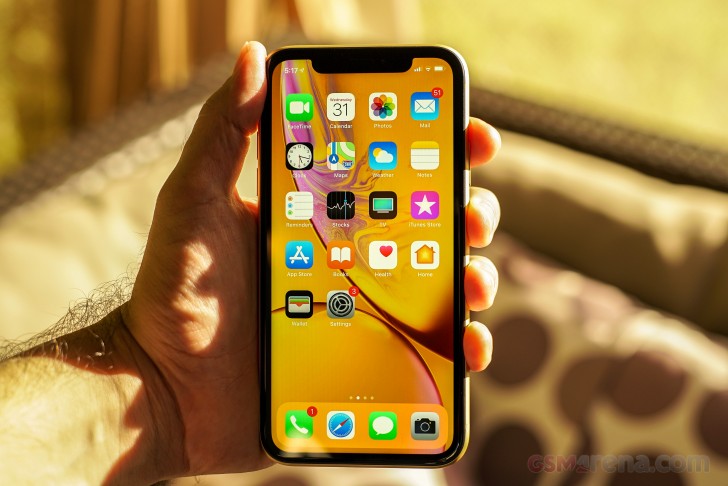
    A picture of the iPhone XR

    The XR Has Had a Good Run

    Launched in 2018, the XR brought Apple’s A12 Bionic chip, Face ID, and a colourful design to the masses. But in tech years, that’s ancient. Here’s what’s happening:

    •  No iOS 19 Support — Reports suggest Apple will not extend iOS 19 support to the XR, XS, or XS Max.
    • No More Security Updates — Without updates, your phone is more vulnerable to bugs and exploits.
    • App Compatibility Issues — As developers optimize apps for newer iOS versions, performance on older devices can suffer.

    Time to upgrade — but not blindly. Let’s compare options.


    Your 2025 Upgrade Options

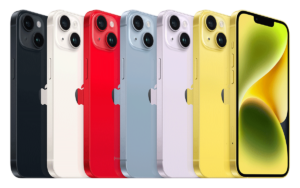
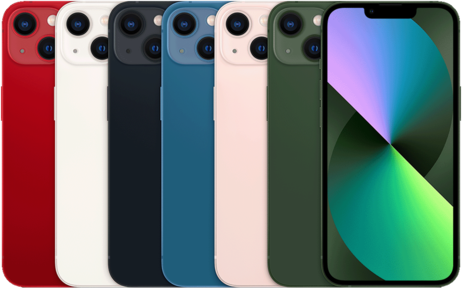
    111872 iphone13 colors 480

     iPhone 13 (2021) – A Solid Mid-Range Choice

    • Chip: A15 Bionic (faster and more efficient than XR’s A12)
    • Camera: Dual camera with Cinematic Mode
    • Pros: Reliable performance, long battery life, still receiving updates until at least 2028
    • Why Upgrade? Great step up without breaking the bank.
    iPhone14 rangeyellow 300x188 1

     iPhone 14 Plus (2022) – Big Battery, Big Screen

    • Chip: A15 Bionic with better thermal management
    • Pros: 6.7″ screen, huge battery, still “new enough”
    • Why Upgrade? If you want longevity, size, and better low-light photos.

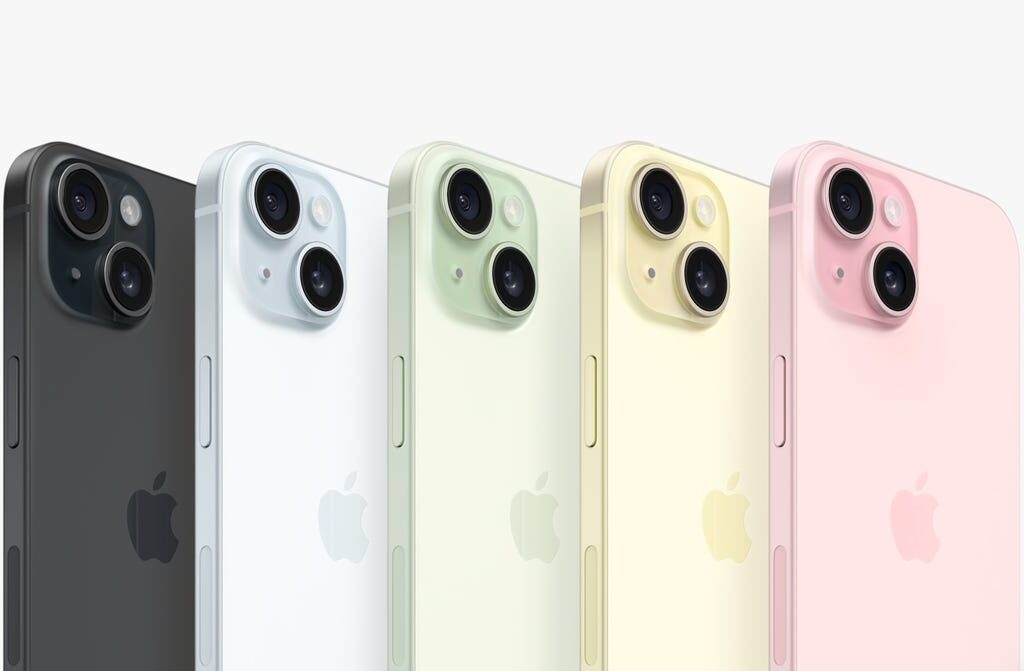
    screenshot 2023 09 12 at 10 38 30 am 1

     iPhone 15 (2023) – USB-C + Dynamic Island Comes to Base Models

    • Chip: A16 Bionic
    • Pros: USB-C, brighter screen, Dynamic Island (finally!), improved cameras
    • Why Upgrade? Modern design with future-ready features — but not too pricey.
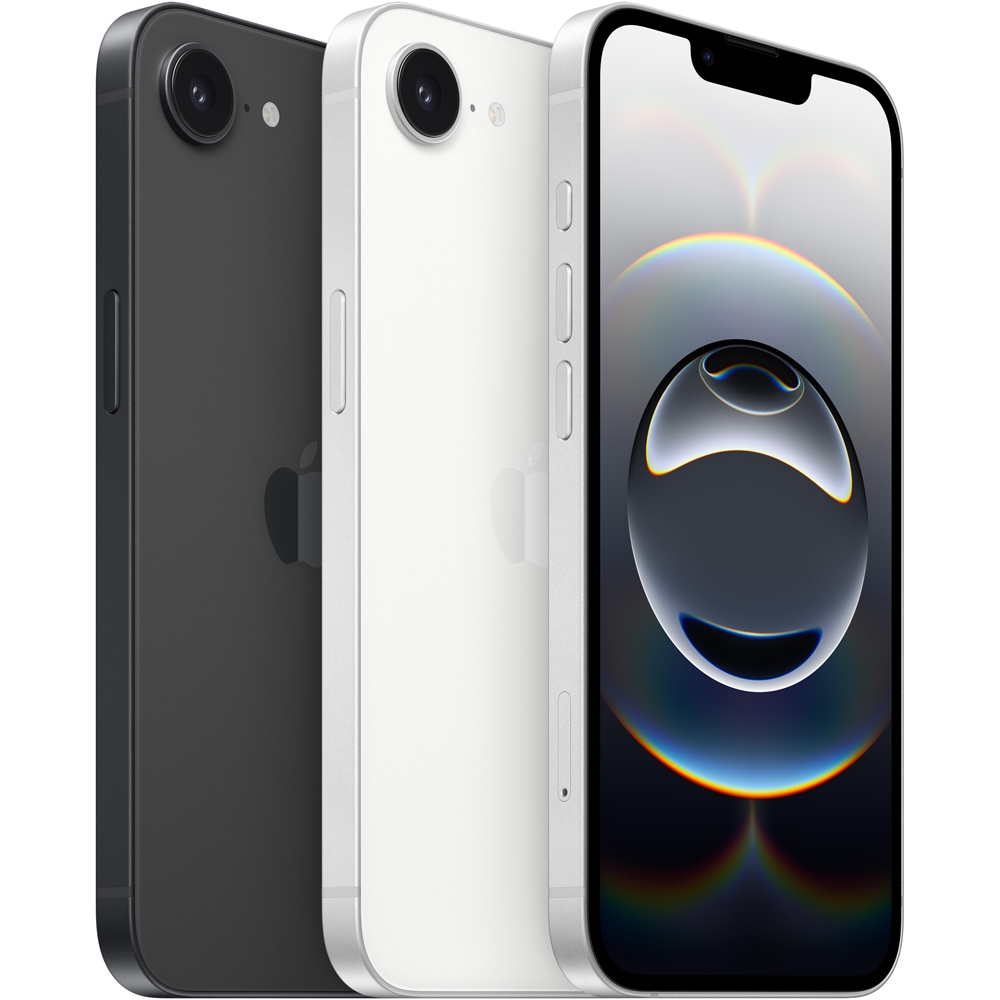
    iphone 16e black 05 568aa3391

    iPhone 16e (2024) – The XR’s Spiritual Successor

    • Chip: A17 Fusion (a slightly underclocked A17 Pro)
    • Pros: Lightweight, colourful, and affordable with many flagship features
    • Battery Life: Optimized for all-day use
    • Why Upgrade? If you loved the XR’s balance of fun + function, the 16e is your next best friend. It’s Apple’s answer to “budget but bold” in 2025.
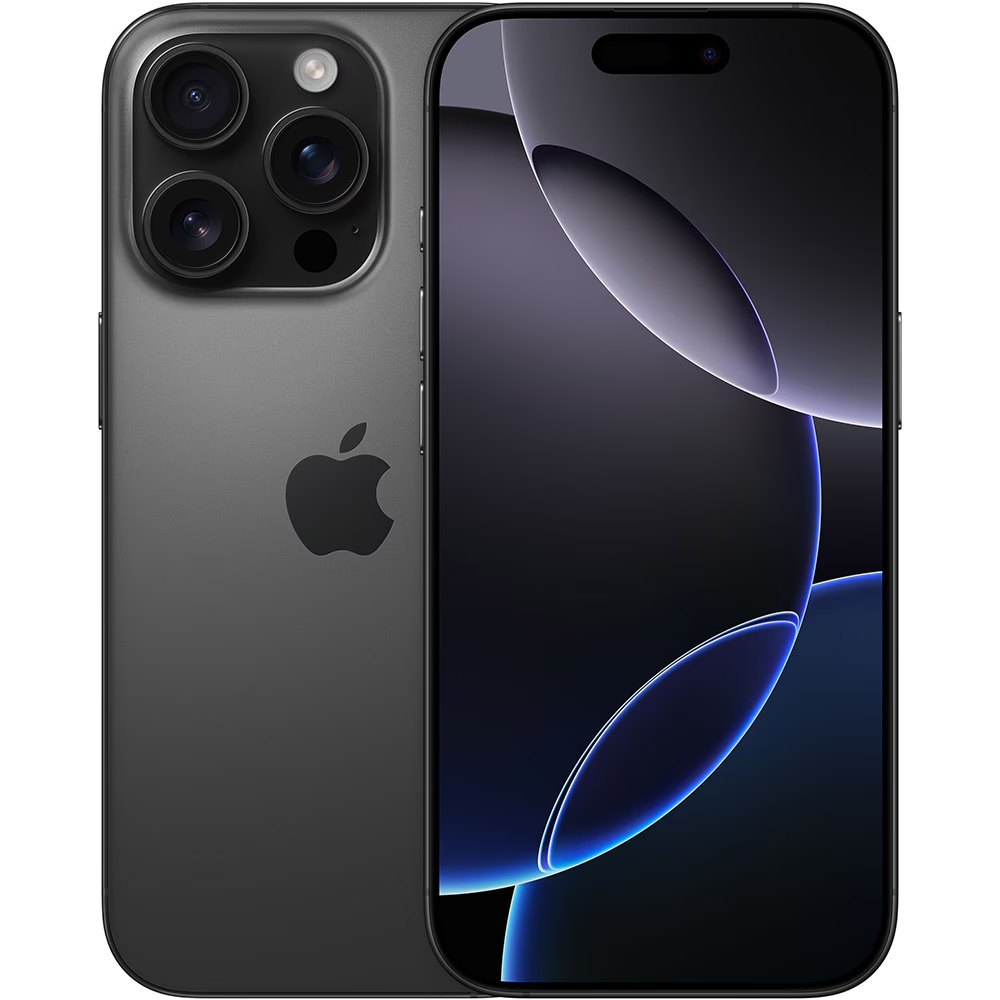
    iphone 16 pro black 1 22012457

    iPhone 16 Pro (2024) – For the Power User

    • Chip: A18 Pro
    • Pros: Best cameras, titanium build, Apple Intelligence features, USB-C
    • Why Upgrade? For creators, multitaskers, or anyone wanting top-tier everything.

    Quick Comparison Chart

    iPhone Model Release Year        iOS Support Ends (Est.)         Ideal For…

    iPhone 13           2021                         ~2028                                                      Reliable upgrade

    iPhone 14+.     2022                            ~2029                                                      Screen lovers

    iPhone 15           2023                            ~2030                                                    Balanced modern choice

    iPhone 16e        2024                             ~2031                                                    XR fans

    iPhone 16           2024                             ~2031+                                                   Creators, power users

    What to Do with Your XR

    Before you make the leap:

    1. Backup Your Data – Use iCloud or Finder on Mac.
    2. Factory Reset – Wipe it clean before selling or recycling.
    3. Sell or Trade-In – Ogabassey will offer you decent value for it.
    4. Repurpose It – Use it as a dedicated music player, camera, or microphone for content creation.
  • Is It Time to Upgrade My MacBook?

    Even the fiercest Apple Critics will agree that the MacBook is one of Apple’s best inventions, its reliability means it’s one of those possessions that we typically bond with. But as with all tech, a time comes when you ask yourself the dreaded question: “Is it time to upgrade my MacBook?”

    Before you go emptying your savings account or adding a shiny new MacBook to your cart, let’s help you answer that question smartly.


    1. Your MacBook Is Slowing Down (and It’s Not Just in Your Head)

    If it takes longer to boot, apps are crawling, and you see that spinning beach ball more than you’d like, your MacBook might be gasping for retirement. While a quick cleanup or RAM upgrade (on older models) might help, performance issues are a clear signal that you’re outgrowing your device.

    Quick tip: If you’re using a MacBook from 2015 or earlier, you’re definitely due for an upgrade. Apple Silicon Macs (M1, M2, M3 and the new M4) are miles ahead in speed and battery life.


    2. Software Support Has Left the Chat

    Apple usually supports macOS updates for MacBooks up to 7 years. So, if your Mac no longer receives the latest updates (like macOS Sequoia), that’s a big red flag. Lack of updates means you’re missing out on security patches and new features.

    Not sure? Head to System Settings → General → Software Update and check if you’re on the latest macOS version.


    3. Battery Life Feels Like a Joke

    A MacBook that dies after 2 hours of YouTube is basically a desktop. If your battery is draining faster than you can charge it, and you’re always plugged in, you’re losing the portability that makes a MacBook great in the first place.

    Yes, battery replacements are an option, but if your Mac is already aging in other areas, it may not be worth the investment.


    4. You Need More Power for New Workflows

    Let’s say you started your Mac life just browsing and watching movies, but now you’re editing 4K videos, coding in Xcode, or running heavy apps like Logic Pro or Adobe Suite. If your current Mac can’t keep up, it’s not you, it’s your laptop.

    Pro tip: The newer M-series chips handle multitasking and demanding tasks like a dream. The M4 chip in particular is a beast for creatives and professionals alike.


    5. You’re Missing Out on the New Features

    Centre Stage, faster FaceTime, blazing SSDs, MagSafe charging, universal control across devices, and gorgeous Retina displays—these aren’t just gimmicks. Apple’s newer MacBooks offer real-life upgrades that can enhance your productivity and experience.


    So… Should You Upgrade?

    Here’s a quick cheat sheet:

    Situation                                                                                     Recommendation

    MacBook older than 7 years                                              Upgrade ASAP

    No more macOS updates                                                   Upgrade

    Sluggish performance and poor battery                      Strongly consider upgrading

    You need more power for pro work                                Upgrade to M-series

    Just bored and want the latest toy                                 Only if your budget allows

  • 5 Things You Didn’t Know Your iPad Can Do

    When most people think about their iPads, the first things that come to mind are streaming movies, browsing the internet, or doing light work on the go. But your iPad is hiding a few secret superpowers under that sleek screen—features that can seriously upgrade your daily routine, productivity, and even your creativity.

    Let’s dive into 5 underrated features your iPad can do that’ll make you say, “Wait… what?!”


    1. Turn Your iPad Into a Second Mac Screen with Sidecar

    If you’re a Mac user, this one’s a game changer. With Sidecar, your iPad becomes a fully functional second display for your Mac. Just connect wirelessly or with a cable, and boom—extra screen real estate for editing, multitasking, or dragging that annoying Zoom window away from your main screen.

    How to use it:
    On your Mac, go to Display Settings > Add Display > Select your iPad.


    2. Scan Documents Like A Pro (No App Needed!)

    You don’t need a fancy scanner or third-party app. The Notes app on your iPad can scan documents with shocking clarity. Just open a new note, tap the camera icon, and choose “Scan Documents.” You can crop, colour-correct, and even sign them on the spot.

    Perfect for: forms, receipts, contracts, or saving pages from that old textbook.


    3. Trackpad-Like Precision with Magic Keyboard or Touchpad

    Your iPad with iPadOS now supports full trackpad functionality. If you pair it with the Magic Keyboard or any Bluetooth trackpad, the iPad suddenly behaves like a mini-Mac, cursor, right-clicks, and all. Great for writing, editing, and working on spreadsheets.

     It feels so natural, you might just forget it’s still a tablet.


    4. Use Your Apple Pencil to Scribble in Any Text Field

    Typing is cool. But Scribble takes the Apple Pencil to a new level. With iPadOS, you can handwrite into any text field—search bars, notes, even browser forms—and your handwriting gets converted to typed text.

    Great for: people who think better with a pen in hand.


    5. Run Full Apps Side-by-Side with Split View & Slide Over

    Multitasking on iPad is powerful—if you know how to use it. With Split View, you can have two apps open side by side (like Safari + Notes), and with Slide Over, you can bring in a third floating app for quick tasks (like Messages or Calculator).

     Pro tip: You can drag and drop between apps (like dragging a photo from Safari into an email).


    Final Thoughts

    Your iPad is way more powerful than you think. Whether you’re a student, a remote worker, or just a tech lover, unlocking these hidden features can transform your tablet into a true productivity (and creativity) beast.

    Next time someone says, “It’s just a bigger iPhone,” send them this post.


     Looking for the perfect iPad or Apple accessory?
    Check out our latest deals on Ogabassey.com – from iPads to Apple Pencils, we’ve got what you need to unlock the full potential of your gear.

  • Are Samsung Laptops Really Good? A Deep Dive into Their Latest Models

    Samsung has long been a dominant force in the smartphone and TV markets, but its presence in the laptop arena has been more understated. With the release of its latest Galaxy Book series, Samsung aims to solidify its position among top-tier laptop manufacturers. Let’s explore the strengths and weaknesses of their recent models to determine if Samsung laptops truly stand out.


    1. Galaxy Book3 Ultra: A Powerhouse for Professionals

    The Galaxy Book3 Ultra is Samsung’s flagship laptop, designed to rival high-end competitors like the MacBook Pro and Dell XPS. It boasts a 16-inch 3K AMOLED display with a 120Hz refresh rate, delivering vibrant visuals ideal for creatives and professionals. Under the hood, it offers up to an Intel Core i9-13900H processor and NVIDIA GeForce RTX 4070 GPU, ensuring robust performance for demanding tasks.​

    Pros:

    • Stunning AMOLED display with high refresh rate​
    • Powerful CPU and GPU configurations​
    • Sleek and lightweight design for a 16-inch laptop​.

    Cons:

    • Battery life is underwhelming, especially during intensive tasks, lasting around 5-6 hours ​
    • Premium pricing may not justify the performance gains over competitors​

    2. Galaxy Book3 Pro 360: Versatility Meets Elegance

    The Galaxy Book3 Pro 360 is a 2-in-1 convertible laptop that combines performance with flexibility. Featuring a 16-inch AMOLED touchscreen and bundled with the S Pen, it’s tailored for users who value both productivity and creativity. Equipped with Intel’s 13th Gen processors, it handles multitasking with ease.​

    Pros:

    • High-quality AMOLED display with touch and pen support​
    • Convertible design offers versatility.
    • Lightweight and premium build quality.

    Cons:

    • Performance may lag behind competitors in the same price bracket​.
    • Battery life is decent but not exceptional​

    3. Galaxy Book4 Edge: Embracing AI and Portability

    The Galaxy Book4 Edge represents Samsung’s foray into AI-integrated laptops. Powered by the Snapdragon X Elite processor, it promises enhanced AI capabilities, such as real-time translations and intelligent meeting summaries. Its ultra-lightweight design and impressive battery life of up to 22 hours make it ideal for on-the-go users

    Pros:

    • Advanced AI features enhance productivity​
    • Exceptional battery life​
    • Lightweight and portable design​.

    Cons:

    • Performance may not match traditional Intel or AMD-powered
    • Limited availability in certain markets

    Final Verdict: Are Samsung Laptops Worth It?

    Samsung’s latest laptops showcase the company’s commitment to innovation, blending powerful hardware with sleek designs and unique features. The Galaxy Book3 Ultra stands out for professionals seeking top-tier performance, while the Book3 Pro 360 offers versatility for creatives. The Book4 Edge introduces promising AI capabilities, catering to the evolving needs of modern users.​

    However, potential buyers should consider factors like battery life and pricing. While Samsung laptops excel in design and display quality, some models may fall short in battery longevity and offer less value compared to competitors.​

    Recommendation: If you’re deeply integrated into the Samsung ecosystem and prioritize design and display quality, these laptops are compelling choices. However, if battery life and cost-effectiveness are top priorities, exploring other brands might be beneficial.

  • Is the Redmi A5 the Best Budget Phone of 2025?

    The Redmi A5 is Xiaomi’s latest addition to its budget-friendly smartphone lineup, offering a blend of modern features and affordability. Here’s an in-depth look at what this device brings to the table:​

    Design and Display

    The Redmi A5 features a sizable 6.88-inch display with a 120Hz refresh rate, ensuring smooth visuals during daily use. The phone features a 720 x 1640 pixels display (HD+) which is standard for devices in this price range. The design includes a side-mounted fingerprint sensor for convenient security access. ​

    Performance

    Under the hood, the Redmi A5 is powered by the Unisoc T7250 chipset, featuring a combination of Cortex-A75 and Cortex-A55 cores, along with a Mali-G57 GPU. This setup should handle everyday tasks and moderate gaming with relative ease. The device is available in two configurations: 3GB of RAM with 64GB of storage, and 4GB of RAM with 128GB of storage, catering to different user needs.

    Camera System

    In the camera department, the Redmi A5 is equipped with a 32MP rear sensor, a shift from the 50MP sensors seen in previous models. The front houses an 8MP selfie camera, an upgrade from earlier iterations. Both cameras are capable of recording 1080p videos at 30fps, suitable for casual photography and video calls. ​

    Battery Life

    A robust 5,200mAh battery powers the Redmi A5, supporting 18W charging. However, the device comes with a 15W charger included in the box. This substantial battery capacity ensures prolonged usage, accommodating activities like extended video playback and gaming sessions. ​

    Software and Features

    The Redmi A5 runs on Android 15 with Xiaomi’s HyperOS 2.0 overlay, providing an up-to-date and user-friendly interface. Additional features include dual-band Wi-Fi, Bluetooth connectivity, and a 3.5mm headphone jack, catering to various user preferences. ​

    Pricing and Availability

    The Redmi A5 is available in two configurations: 3GB/64GB priced at ₦96,200 and 4GB/128GB at ₦111,200. Colour options include Black, Green, Silver, and Blue.

    Conclusion

    The Redmi A5 offers a balanced mix of features suitable for users seeking a budget-friendly smartphone capable of handling daily tasks and moderate multimedia consumption. Its large display, competent camera setup, and substantial battery life make it a noteworthy contender in the entry-level segment.